Chapter 1. Light It Up
One of the best ways to get familiar with Enyo is to get a taste for what an Enyo app looks like. We’re going to do a little virtual time travel and fast-forward to a point just after you finish reading this book. We’re going to imagine you work for a software company that produces apps for customers.
A New Project
Your boss just came and told you that he needs a light implemented in JavaScript right away. He tells you that your company’s best client needs to be able to embed a light app on their web page and it must work cross-platform. Fortunately, you’ve just finished reading this book and are excited to use Enyo on a project.
You decide to make a nice yellow circle and draw that on the screen:
enyo.ready(function(){enyo.kind({name:'Light',style:'width: 50px; height: 50px; border-radius: 50%;'+'background: yellow;'});newenyo.Application({name:'app',view:'Light'});});

Tip
Try it out: jsFiddle.
With Enyo, you don’t (usually) have to worry about the HTML that makes up your app. Enyo creates it all for you. In this case, you’ve created a new kind (Enyo’s building blocks are called kinds, you recall) called Light and you used a little CSS magic you found on the Web to draw a circle without the use of images or the canvas.
While using Enyo’s Application component, you placed the new kind into the page’s body element, causing Enyo to create the HTML. You recall that the enyo.ready() method executes code when the framework is fully loaded. You inspect the HTML for the circle using your favorite browser’s debugging tool and see that Enyo created a div element for you and applied the style you supplied. Not bad for a few minutes’ work.
Improvements
Now that you’re feeling good about what you did, you check in the first version of the code to the company’s source code management system. You know from past experience that sales will probably need the light in more colors than yellow. So, you decide to use Enyo’s property feature to set the color when the kind is created:
enyo.kind({name:'Light',color:'yellow',style:'width: 50px; height: 50px; border-radius: 50%;',create:function(){this.inherited(arguments);this.colorChanged();},colorChanged:function(oldValue){this.applyStyle('background-color',this.color);}});
Tip
Try it out: jsFiddle.
Tip
This code (and the following samples) does not include the enyo.ready() line and the instantiation of the Application kind, but you’ll still need it. We’ll only focus on the areas that changed.
You note that you’ve added a default color for the light, in case none is defined, and you’ve added a function that Enyo will call if anyone updates the light color after the kind has been created. You had to add some code to the create() function that Enyo calls on all components so that you can set the initial color. First, you test that you can set the color at create time by passing in a JavaScript object with the color value you want:
newenyo.Application({name:'app',view:{kind:'Light',color:'green'}});

Looks like that works as expected. Now you can test that you can set the color after creation:
varapp=newenyo.Application({name:'app',view:Light});app.set('view.color','blue');
Tip
Try it out: jsFiddle.
You remember that when you use set(), Enyo will automatically call the colorChanged() method for you when the color changes. Looks like that works well, too.
You check in the latest version of the code and shoot an e-mail off to your boss. Your latest change added a bit more code but you know that you’ll be able to use that light component again and again, regardless of what color sales promises.
Curveball
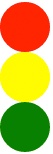
Not long after you send off the e-mail, the phone rings. Your boss explains that sales finally let him know that the light they needed was actually a traffic light, with red on the top, yellow in the middle, and green on the bottom.
Fortunately, you’ve done the hard work. Getting the traffic light done should be a breeze now. You recall that Enyo supports composition, allowing you to make a new kind by combining together other kinds. Diving back into the code, you create a new TrafficLight kind:
enyo.kind({name:'TrafficLight',components:[{name:'stop',kind:'Light',color:'red'},{name:'slow',kind:'Light',color:'yellow'},{name:'go',kind:'Light',color:'green'}]});
Tip
Try it out: jsFiddle.
Not bad, if you do say so yourself. You reused the Light kind you created and you didn’t have to copy all that code over and over. You push your changes up, shoot another e-mail off to your boss and wait for the phone to ring again.
QA on the Line
The next call is not, surprisingly, from your boss, but from the QA department. They did some testing with the lights and found that they don’t turn off. They mention something about the specs for the light, saying that tapping the light should toggle it on and off. While wondering how they managed to get ahold of specs you’d never seen, you begin thinking about how you’ll implement that. You quickly hang up after asking for a copy of the specs.
You remember that Enyo has an event system that allows you to respond to various events that occur. You can add a new property for the power state of the light and you can toggle it when you receive a tap event (an event you know is optimized to perform well on mobile devices with touch events). After thinking some more about the problem, you realize you don’t really want to change your existing light kind. You remember that Enyo supports inheritance, allowing you to create a new light that has all the same behaviors as your existing light, plus the new behaviors you need:
enyo.kind({name:'PoweredLight',kind:'Light',powered:true,handlers:{'ontap':'tapped'},create:function(){this.inherited(arguments);this.poweredChanged();},tapped:function(sender,event){this.set('powered',!this.get('powered'));},poweredChanged:function(oldValue){this.applyStyle('opacity',this.powered?'1':'0.2');}});
Tip
Try it out: jsFiddle.
You made use of the handlers block to add the events you want to listen for and specified the name of the method you wanted to call. You recall that in Enyo, you use the name of the event instead of the event itself because Enyo will automatically bind the methods to each instance of your kind so it can access the methods and data of your kind’s instance.
In your tap handler, you used the partner to the set() method, get(), to retrieve the current value of the powered property and toggle it. In the poweredChanged() function, you apply a little opacity to the light to give it a nice look when it’s powered off (you can read a local property directly without get()). You update the TrafficLight kind, give it a quick test in the browser, and verify that everything looks good.
The E-mail
Just after you commit the latest changes, you receive a copy of the specs from QA. Looks like you’ve got everything covered except for a logging feature. The specs call for a log to be maintained of which light was activated or deactivated and the time of the event. Events, huh? Sounds like it’s time to revisit Enyo events. You recall from your training that Enyo allows kinds to create their own events, to which other kinds can subscribe.
You quickly add a new event to the PoweredLight kind called onStateChanged. You know that Enyo automatically creates a method called doStateChanged() that you can call to send the event to a subscriber. You quickly add the relevant code:
enyo.kind({name:'PoweredLight',kind:'Light',powered:true,events:{'onStateChanged':''},handlers:{'ontap':'tapped'},create:function(){this.inherited(arguments);this.poweredChanged();},tapped:function(sender,event){this.set('powered',!this.get('powered'));},poweredChanged:function(oldValue){this.applyStyle('opacity',this.powered?'1':'0.2');this.doStateChanged({powered:this.powered});}});
Now you just need to subscribe to the event in the TrafficLight kind. You could, of course, subscribe to onStateChanged in each Light definition, but you remember that the handlers block lets you subscribe to events a kind receives regardless of which child originates them. You know you can use the sender parameter to check to see which light sent the event and you can use the event parameter to access the object sent by the light:
enyo.kind({name:'TrafficLight',handlers:{'onStateChanged':'logStateChanged'},components:[{name:'stop',kind:'PoweredLight',color:'red'},{name:'slow',kind:'PoweredLight',color:'yellow'},{name:'go',kind:'PoweredLight',color:'green'}],logStateChanged:function(sender,event){enyo.log(sender.name+' powered '+(event.powered?'on':'off')+' at '+newDate());}});
Tip
Try it out: jsFiddle.
A quick logging function and a handlers block later and things are starting to look finished. After the code has been checked in and QA has signed off, you can relax and start planning that vacation—as if that will happen.
Summary
We’ve just worked through a simple Enyo application and explored several of the concepts that make using Enyo productive. We saw how easy it is to quickly prototype an application and how Enyo kept the code maintainable and potentially reusable. With this foundation, we’ll be able to explore the deeper concepts of Enyo in the coming chapters.
Get Enyo: Up and Running now with the O’Reilly learning platform.
O’Reilly members experience books, live events, courses curated by job role, and more from O’Reilly and nearly 200 top publishers.

