WHEN YOU SELECT your Arduino Uno board from Tools⇒Board in the Arduino IDE, you might notice that that it is just one item in a very long list of board names. All the others sound just as exciting. So, what makes them different from your Uno? There’s not room in this book to describe all of them but in this adventure you will get to know one of them—the Arduino Leonardo. The Leonardo has a special skill that the Uno doesn’t have: it can make a computer believe that the Arduino board is a USB keyboard or mouse.
For this adventure, you also use a sensor that detects whether it’s in bright light or shadow. You use this to create a USB game controller. The sensor means you will be able to wave your hands in the air above the controller to play computer games!
What You Need
You need the following items for the first part of the adventure (see Figure 7-1):
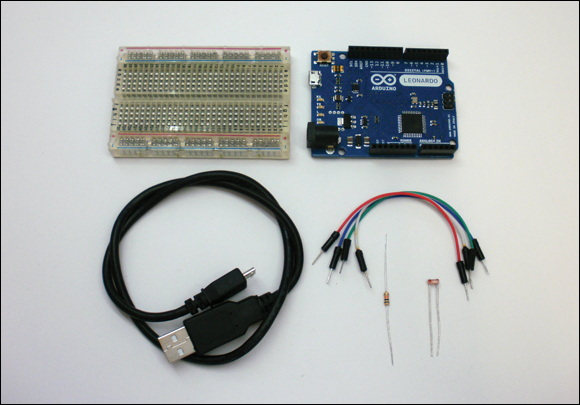
Figure 7-1 The electronic components you need for the first part of this adventure
- A computer
- An Arduino Leonardo
- A USB Micro cable
- A breadboard
- 4 jumper wires
- A light-dependent resistor
- A 10kΩ resistor
Introducing the Arduino Leonardo
One of the many great things about the Arduino platform is that you can choose a different board for your project without having to change the code. You can use almost all the code you have learned ...
Get Adventures in Arduino now with the O’Reilly learning platform.
O’Reilly members experience books, live events, courses curated by job role, and more from O’Reilly and nearly 200 top publishers.

