September 2019
Intermediate to advanced
154 pages
3h 31m
English
Whenever you deploy a cloud-based application that processes many different user requests or runs a long batch calculation, monitoring its evolution is essential.
You need to keep a log of all of the different actions that involve your system as well as each request so that you can review and analyze them. You might detect that something is taking longer than it should and that one of the steps is bottlenecking the entire system. You might also want to get automatic alerts when something is not working properly so that a responsible technician can act on it.
In this final chapter, we focus on how you can use Azure Monitor to ensure that you have insight into how your serverless project is performing.
Because we are using the Azure cloud infrastructure for our serverless solutions, we can rely on the Azure Monitor service.
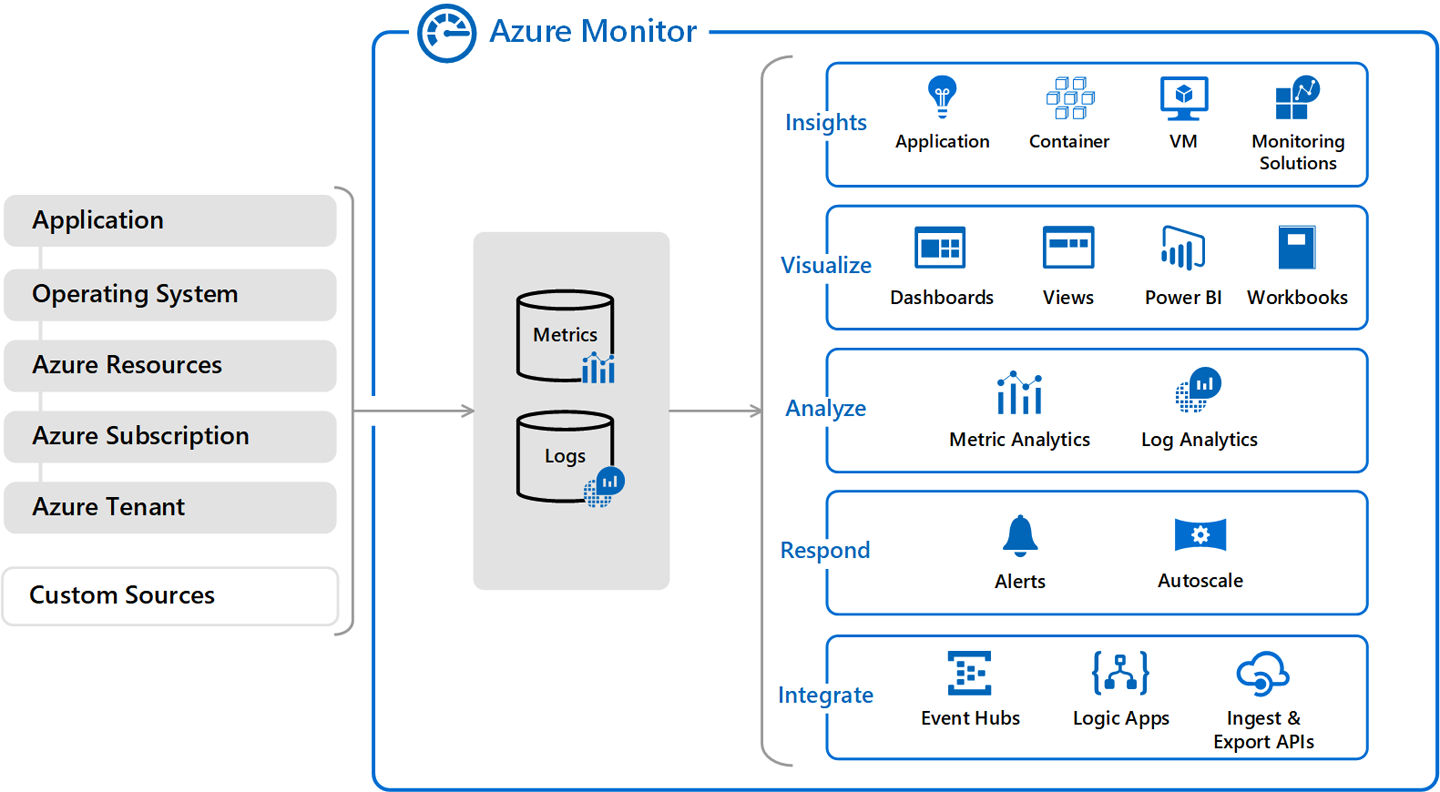
Azure Monitor is a solution for collecting telemetry data and analyzing it in a cloud environment. With Azure Monitor, you can understand how your cloud applications are performing and identify possible issues affecting them.
An Azure Monitor configuration for a project can be divided into three different aspects, as depicted in Figure 8-1: the storage of all the data for metrics and logs, the analysis and alerting functionality, and log streaming to other systems.
Read now
Unlock full access


 O’Reilly covers everything we've got, with content to help us build a world-class technology community, upgrade the capabilities and competencies of our teams, and improve overall team performance as well as their engagement.I wanted to learn C and C++, but it didn't click for me until I picked up an O'Reilly book. When I went on the O’Reilly platform, I was astonished to find all the books there, plus live events and sandboxes so you could play around with the technology.I’ve been on the O’Reilly platform for more than eight years. I use a couple of learning platforms, but I'm on O'Reilly more than anybody else. When you're there, you start learning. I'm never disappointed.I'm always learning. So when I got on to O'Reilly, I was like a kid in a candy store. There are playlists. There are answers. There's on-demand training. It's worth its weight in gold, in terms of what it allows me to do.