February 2002
Intermediate to advanced
720 pages
21h 37m
English
Your application uses a lot of queries, and you don’t want these queries available or even visible to the users of your application. Also, you call your queries from VBA code. How can you hide the queries from users and make them easier to retrieve, modify, and execute?
You can create a query-management table that stores the SQL string of your queries in a memo field. Each query is named and includes a description. This technique allows you to store your queries in a table rather than in the Access collection of queries. You can also create a simple VBA function that you can use to quickly retrieve the SQL string of any of your saved queries.
Open and run frmSavedQueries from 01-15.MDB.
After a few moments of processing, the form shown in Figure 1-44 should appear. This form is based on the
tblQueryDefs table, which stores a record for each query you save. To
add a new query to the table, add a new record and enter the SQL
statement in the SQL Text control. You may find it easier to copy the
SQL from an existing query (see Step 2 for more details). Type in a
name and description. Notice that creation and modification times are
automatically updated.
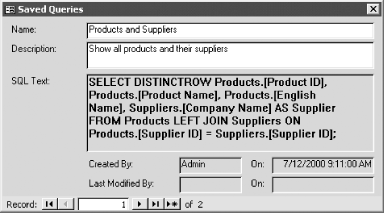
Figure 1-44. The saved queries form, frmSavedQueries
To use a saved query in your code, search the tblQueryDefs table for the name of a query and get ...
Read now
Unlock full access


 O’Reilly covers everything we've got, with content to help us build a world-class technology community, upgrade the capabilities and competencies of our teams, and improve overall team performance as well as their engagement.I wanted to learn C and C++, but it didn't click for me until I picked up an O'Reilly book. When I went on the O’Reilly platform, I was astonished to find all the books there, plus live events and sandboxes so you could play around with the technology.I’ve been on the O’Reilly platform for more than eight years. I use a couple of learning platforms, but I'm on O'Reilly more than anybody else. When you're there, you start learning. I'm never disappointed.I'm always learning. So when I got on to O'Reilly, I was like a kid in a candy store. There are playlists. There are answers. There's on-demand training. It's worth its weight in gold, in terms of what it allows me to do.