March 2008
Intermediate to advanced
982 pages
22h 43m
English
You need to update a database with changes that you have made to data in a DataGridView control.
Use a DataAdapter to update the database with the changes in the data source for the DataGridView control.
Follow these steps:
The solution uses a table named DataGridView in the AdoDotNet35Cookbook database. Execute the following T-SQL statement to create the table:
	USE AdoDotNet35Cookbook
	GO
	CREATE TABLE DataGridView(
	    Id int NOT NULL PRIMARY KEY,
	    IntField int NULL,
	    StringField nvarchar(50) NULL )
Execute the following T-SQL batch to create the sample data required by the solution:
	USE AdoDotNet35Cookbook
	GO
	INSERT INTO DataGridView VALUES (1, 10, 'Field1.1')
	INSERT INTO DataGridView VALUES (2, 20, 'Field1.2')
	INSERT INTO DataGridView VALUES (3, 30, 'Field1.3')
	INSERT INTO DataGridView VALUES (4, 40, 'Field1.4')
Create a C# Windows Forms application, UpdateDataWindowsFormDataGridView.
Add the following controls to the Form1 design surface:
DataGridView named dataGridView
Button named saveButton with Text property = Save
The completed layout of the Windows Form named Form1 is shown in Figure 8-29.
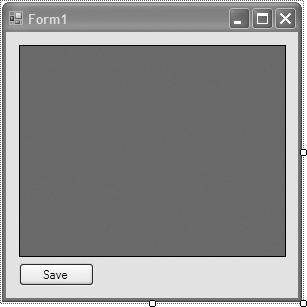
Figure 8-29. Layout for Form1 in UpdateDataWindowsFormDataGridView solution
The C# code in Form1.cs in the project UpdateDataWindowsFormDataGridView is shown in Example 8-27. The code creates a DataTable that contains ...
Read now
Unlock full access


 O’Reilly covers everything we've got, with content to help us build a world-class technology community, upgrade the capabilities and competencies of our teams, and improve overall team performance as well as their engagement.I wanted to learn C and C++, but it didn't click for me until I picked up an O'Reilly book. When I went on the O’Reilly platform, I was astonished to find all the books there, plus live events and sandboxes so you could play around with the technology.I’ve been on the O’Reilly platform for more than eight years. I use a couple of learning platforms, but I'm on O'Reilly more than anybody else. When you're there, you start learning. I'm never disappointed.I'm always learning. So when I got on to O'Reilly, I was like a kid in a candy store. There are playlists. There are answers. There's on-demand training. It's worth its weight in gold, in terms of what it allows me to do.