August 2004
Intermediate to advanced
848 pages
23h
English
You need to display a very large
set of data in a
DataGrid, yet the user must be able to page
through it quickly. This approach is beneficial anytime you have to
navigate through thousands of records.
Use custom paging with a DataGrid and, using a
stored procedure, read from the database only the data that is needed
for a given page. An example of the output that can be achieved with
this approach is shown in Figure 1-11. Examples
Example 1-27 through Example 1-29
show the .aspx and code-behind files for an
application that illustrates this approach; the application uses the
stored procedure shown in Example 1-26 to retrieve
the data to display.
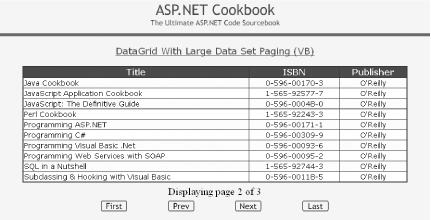
Figure 1-11. Paging through a record-heavy DataGrid output
The solution we advocate for the problem of paging through large datasets requires a somewhat different approach to both custom paging and managing the labels used to display the current and total pages.
To enable paging and to allow you to control movement within the
dataset when data binding, the
DataGrid’s
AllowPaging and
AllowCustomPaging attributes
must be set to
True. When AllowCustomPaging is
set to False (the default), the
DataGrid assumes that all of the data that can be
displayed in all pages is present in the data source, and it
calculates the group of records to display from the
CurrentPageIndex and ...
Read now
Unlock full access


 O’Reilly covers everything we've got, with content to help us build a world-class technology community, upgrade the capabilities and competencies of our teams, and improve overall team performance as well as their engagement.I wanted to learn C and C++, but it didn't click for me until I picked up an O'Reilly book. When I went on the O’Reilly platform, I was astonished to find all the books there, plus live events and sandboxes so you could play around with the technology.I’ve been on the O’Reilly platform for more than eight years. I use a couple of learning platforms, but I'm on O'Reilly more than anybody else. When you're there, you start learning. I'm never disappointed.I'm always learning. So when I got on to O'Reilly, I was like a kid in a candy store. There are playlists. There are answers. There's on-demand training. It's worth its weight in gold, in terms of what it allows me to do.