July 2005
Beginner
719 pages
19h 54m
English
This section introduces you to the AppleScript language and the many ways it can be utilized. AppleScripts have access to the internals of running applications and can issue commands or request data. By extracting data from one application and feeding it into another, you can create complex workflows with AppleScript. This can end up saving you a lot of repetition in your daily activities, freeing you up for the activities that demand more creativity.
The tool to use for a basic AppleScript is the purpose-built Script Editor application, which you can find in the /Applications/AppleScript folder. Script Editor is a basic editor, but it is designed for AppleScript and has some useful features such as syntax checking and reformatting, which can make scripts easier to read.
Each window of Script Editor (see Figure 12-1) is for a separate script. In the toolbar are buttons for recording a script; stopping the operation in progress; running a script; and compiling, which checks syntax and reformats.
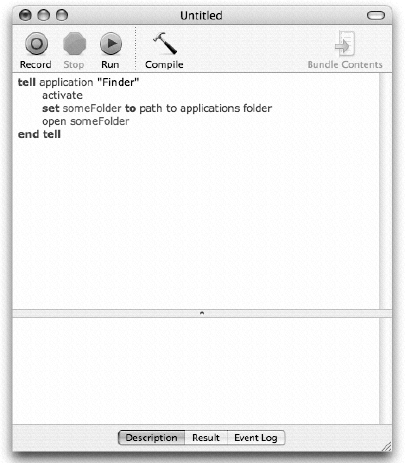
The Script Editor also gives you a means to browse the dictionary of any application. The dictionary includes the various properties and commands that can be accessed by AppleScript. You can open an application's dictionary by choosing FileOpen Dictionary and then choosing an application.
In this first Try It Out, ...
Read now
Unlock full access


 O’Reilly covers everything we've got, with content to help us build a world-class technology community, upgrade the capabilities and competencies of our teams, and improve overall team performance as well as their engagement.I wanted to learn C and C++, but it didn't click for me until I picked up an O'Reilly book. When I went on the O’Reilly platform, I was astonished to find all the books there, plus live events and sandboxes so you could play around with the technology.I’ve been on the O’Reilly platform for more than eight years. I use a couple of learning platforms, but I'm on O'Reilly more than anybody else. When you're there, you start learning. I'm never disappointed.I'm always learning. So when I got on to O'Reilly, I was like a kid in a candy store. There are playlists. There are answers. There's on-demand training. It's worth its weight in gold, in terms of what it allows me to do.