October 2006
Beginner
658 pages
17h 17m
English
Fedora starts a number of programs automatically when the system is booted. These services (sometimes called Disk And Execution MONitors, or daemons) perform automatic actions on the local computer and, in some cases, perform operations for remote computers on the network, such as sharing files and serving web pages.
Each service consumes memory and processor time, and each network service may provide a weak spot for an attack against your system. Disabling unused services can reduce your boot time, speed up your system, and reduce your security risk.
Select the menu option System→Administration→Services (in KDE, it is System→Services) to start the system-config-services tool, shown in Figure 4-6.
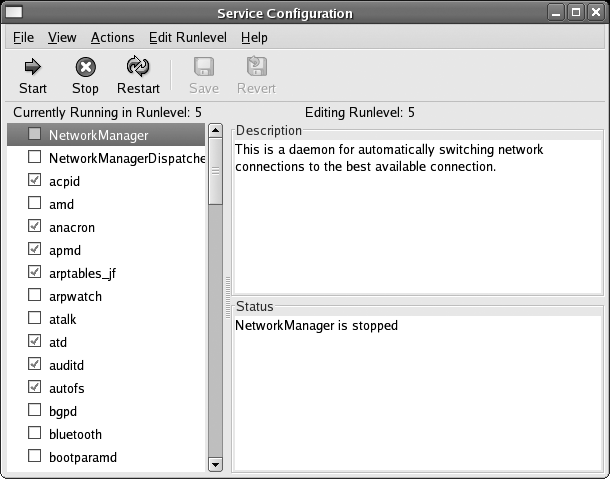
Figure 4-6. Services configuration window
The configuration of the current runlevel is shown by default. Every service with a checkmark in front of it will be started when that runlevel is entered; to add or clear a checkmark, click on the checkbox.
Click on a service name to see a description of that service and its current status (running or stopped). Click on the Save icon (or File→Save Changes) when you’ve configured the services to your liking; your changes will take effect next time you change runlevels or boot the system.
You can edit the settings for another runlevel (3, 4, 5, or all three at the same time) using options on the Edit ...
Read now
Unlock full access


 O’Reilly covers everything we've got, with content to help us build a world-class technology community, upgrade the capabilities and competencies of our teams, and improve overall team performance as well as their engagement.I wanted to learn C and C++, but it didn't click for me until I picked up an O'Reilly book. When I went on the O’Reilly platform, I was astonished to find all the books there, plus live events and sandboxes so you could play around with the technology.I’ve been on the O’Reilly platform for more than eight years. I use a couple of learning platforms, but I'm on O'Reilly more than anybody else. When you're there, you start learning. I'm never disappointed.I'm always learning. So when I got on to O'Reilly, I was like a kid in a candy store. There are playlists. There are answers. There's on-demand training. It's worth its weight in gold, in terms of what it allows me to do.