October 2008
Intermediate to advanced
414 pages
9h 23m
English
In This Chapter
Understanding animation in Flash
Getting ready to animate
Animating with tweens
Editing your animation
Animating with inverse kinematics, armatures, and bones
Managing scenes
In this chapter, we explain animation and making your graphics move. Are you ready to plunge into a world where you can make almost anything seem to happen? Hold on to your hat!
We start by explaining the basics of animation, including how to prepare for animation and how to work with the Timeline. Then we go into the specific techniques — frame-by-frame animation, tweening, and bones — that you can use to create great, animated effects in Flash. We cover motion tweening, shape tweening, and inverse kinematics, and we give you the details of editing your animations.
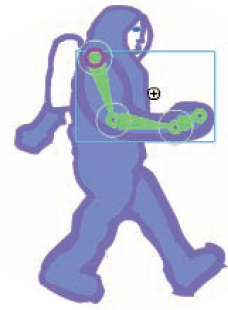
The secret of animation in Flash, like in the movies, is that nothing ever really moves. A Flash movie creates the illusion of movement by quickly displaying a sequence of still images. Each still image is slightly different. Your brain fills in the gaps to give you the impression of movement.
One of the great things about Flash is that you can easily create complicated, spectacular extravaganzas of animation. And Flash stores lots of information in the super-compact vector format. Because the files can be small, they can be transmitted over the Web quickly. That's good for your Web site viewers. ...
Read now
Unlock full access


 O’Reilly covers everything we've got, with content to help us build a world-class technology community, upgrade the capabilities and competencies of our teams, and improve overall team performance as well as their engagement.I wanted to learn C and C++, but it didn't click for me until I picked up an O'Reilly book. When I went on the O’Reilly platform, I was astonished to find all the books there, plus live events and sandboxes so you could play around with the technology.I’ve been on the O’Reilly platform for more than eight years. I use a couple of learning platforms, but I'm on O'Reilly more than anybody else. When you're there, you start learning. I'm never disappointed.I'm always learning. So when I got on to O'Reilly, I was like a kid in a candy store. There are playlists. There are answers. There's on-demand training. It's worth its weight in gold, in terms of what it allows me to do.