July 2005
Beginner
268 pages
7h 41m
English
You can tap into your Mac's regular File Sharing feature (Chapter 6) from over the Internet. This feature is a blessing to anyone who travels, whether with a laptop or to a branch office, because you'll never be up the creek without a paddle if you discover that you left an important file at home.
To connect over the Internet, make sure that you've set up the home-base Mac for file sharing, as explained in Chapter 6. Then, once you're on the road, go online and proceed like this:
Choose Go → Connect To Server.
The Connect To Server dialog box appears, as shown in Figure 9-8.
Type in the IP address (or domain name) of the Mac to which you want to connect, and then click Connect (or press Enter).
If you don't know the shared Mac's IP address, pick up the phone and call somebody who's at home. That person can find out the IP address by opening the Network pane (or Sharing pane) of System Preferences.
And if you've signed up for a DNS naming service as described in the box "IP Addresses and You," you can type your Mac's domain name instead.
Enter your name and password, and then click Connect.
From here, it's just as though you were connecting to another computer on your office network, although it's a good bit slower. But when you're in Hong Kong and need a document from your Mac in Minneapolis, you may not care.
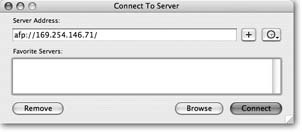
Figure 9-8. The Connect To Server dialog box ...
Read now
Unlock full access


 O’Reilly covers everything we've got, with content to help us build a world-class technology community, upgrade the capabilities and competencies of our teams, and improve overall team performance as well as their engagement.I wanted to learn C and C++, but it didn't click for me until I picked up an O'Reilly book. When I went on the O’Reilly platform, I was astonished to find all the books there, plus live events and sandboxes so you could play around with the technology.I’ve been on the O’Reilly platform for more than eight years. I use a couple of learning platforms, but I'm on O'Reilly more than anybody else. When you're there, you start learning. I'm never disappointed.I'm always learning. So when I got on to O'Reilly, I was like a kid in a candy store. There are playlists. There are answers. There's on-demand training. It's worth its weight in gold, in terms of what it allows me to do.