Skip to Content
Java EE 8 Application Development
book

Java EE 8 Application Development

by David R. Heffelfinger
December 2017
Intermediate to advanced
372 pages
8h 46m
English
Packt Publishing
Content preview from Java EE 8 Application Development

Setting up a JMS message topic

Setting up a JMS message topic in GlassFish is very similar to setting up a message queue.

In the GlassFish web console, expand the Resources node in the tree at the left-hand side, then expand the JMS Resouces node, click the Destination node, then click the New... button in the main area of the web console:
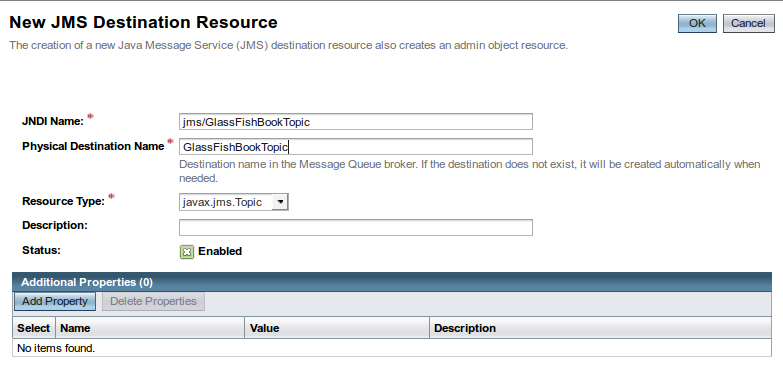
Our examples will use a JNDI Name of jms/GlassFishBookTopic. Since this is a message topic, the Resource Type must be javax.jms.Topic. The Description field is optional. The Physical Destination Name property is required; for our example, we will use GlassFishBookTopic as the value for the Name property. ...

Become an O’Reilly member and get unlimited access to this title plus top books and audiobooks from O’Reilly and nearly 200 top publishers, thousands of courses curated by job role, 150+ live events each month,
and much more.
Start your free trial

You might also like

Java EE 8 Development with Eclipse

Java EE 8 Development with Eclipse

Ram Kulkarni
Beginning EJB in Java EE 8: Building Applications with Enterprise JavaBeans

Beginning EJB in Java EE 8: Building Applications with Enterprise JavaBeans

Jonathan Wetherbee, Massimo Nardone, Chirag Rathod, Raghu Kodali

Publisher Resources

ISBN: 9781788293679Supplemental Content