March 1999
Intermediate to advanced
600 pages
16h 25m
English
Swing, part of the Java Foundation Classes, provides a much more
sophisticated and useful file chooser component written in pure Java,
javax.swing.JFileChooser
:
public class JFileChooser extends JComponent implements Accessible
JFileChooser is not an independent, free-standing
window like FileDialog. Instead, it is a component
you can add to your own frame, dialog, or other container or window.
You can, however, ask the JFileChooser class to
create a modal dialog just for your file chooser. Figure 13.3 shows a file chooser embedded in a
JFrame window with the Metal look and
feel.[26] Of course, like all Swing
components, the exact appearance depends on the look and feel
currently selected.
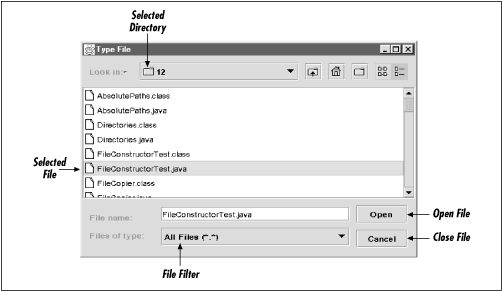
Figure 13-3. A JFileChooser with the Metal look and feel
For the most part, the file chooser works as you expect, especially if you’re accustomed to Windows. You select a file with the mouse. Double-clicking the filename or pressing the Open button returns the currently selected file. You can change which files are displayed by selecting different filters from the pop-up list of choosable file filters. All the components have tooltips to help users who are a little thrown by an unfamiliar look and feel. One difference between a Swing file chooser and a standard, native chooser may surprise you. While double-clicking on a directory will open the directory as you expect, selecting a directory ...
Read now
Unlock full access


 O’Reilly covers everything we've got, with content to help us build a world-class technology community, upgrade the capabilities and competencies of our teams, and improve overall team performance as well as their engagement.I wanted to learn C and C++, but it didn't click for me until I picked up an O'Reilly book. When I went on the O’Reilly platform, I was astonished to find all the books there, plus live events and sandboxes so you could play around with the technology.I’ve been on the O’Reilly platform for more than eight years. I use a couple of learning platforms, but I'm on O'Reilly more than anybody else. When you're there, you start learning. I'm never disappointed.I'm always learning. So when I got on to O'Reilly, I was like a kid in a candy store. There are playlists. There are answers. There's on-demand training. It's worth its weight in gold, in terms of what it allows me to do.