November 2002
Intermediate to advanced
1280 pages
38h 26m
English
Tables represent one of the most common formats for viewing
data. Database records are easy to sort and choose from a table.
Statistics on disk usage can be displayed for several computers or several
time periods all at once. Stock market quotes can be tracked. And where
would sales presentations be without tables? Well, the JTable class in the Swing package now gives you
access to a single component that can handle all of the preceding examples
and more.
Without getting fancy, you can think of tables as an obvious
expression of two-dimensional data. In fact, the JTable class has a constructor that takes an Object[][] argument and displays the contents of
that two-dimensional array as a table with rows and columns. For example,
Figure 15-1 shows how a table
of string objects falls out very quickly.
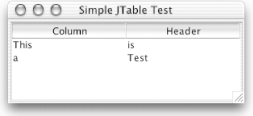
Figure 15-1. A simple JTable with a two-dimensional array of strings for data
This program was generated with very little code. All we did was set
up a JTable object with a String[][] argument for the table data and a
String[] argument for the table’s
headers. Rather than adding the table itself directly to our window, we
enclose it in a scrollpane:
// SimpleTable.java // A test of the JTable class using default table models and a convenience // constructor // import java.awt.*; import javax.swing.*; public class SimpleTable extends JFrame { public SimpleTable( ) { super("Simple ...Read now
Unlock full access


 O’Reilly covers everything we've got, with content to help us build a world-class technology community, upgrade the capabilities and competencies of our teams, and improve overall team performance as well as their engagement.I wanted to learn C and C++, but it didn't click for me until I picked up an O'Reilly book. When I went on the O’Reilly platform, I was astonished to find all the books there, plus live events and sandboxes so you could play around with the technology.I’ve been on the O’Reilly platform for more than eight years. I use a couple of learning platforms, but I'm on O'Reilly more than anybody else. When you're there, you start learning. I'm never disappointed.I'm always learning. So when I got on to O'Reilly, I was like a kid in a candy store. There are playlists. There are answers. There's on-demand training. It's worth its weight in gold, in terms of what it allows me to do.