March 2012
Intermediate to advanced
244 pages
5h 3m
English
Sliders are widgets that allow users to change the numerical value of data by moving a cursor on a graduated axis. For example, a graduated slider from 18 to 100 can allow users to select age graphically rather than entering it manually in an input field.
To display a slider like the one shown in Figure 7-1, we write the following HTML code, followed once again by a call to the jQuery UI method, which manages this type of graphical component:
<!DOCTYPE html>
<script src = jquery.js></script>
<script src = jqueryui/js/jquery-ui-1.8.16.custom.min.js></script>

<link rel=stylesheet type=text/css
      href=jqueryui/css/smoothness/jquery-ui-1.8.16.custom.css />

<h3>Slider</h3>
<div id=slider></div>

<script>

$("div#slider").slider ();

</script>
The slider (axis and cursor) is represented by a <div> element (with slider ID).
A <script> tag is added to
indicate that each <div>
corresponding to a slider is managed by the slider () method.
The operation of a slider is simple: you can move the cursor on its axis either by dragging it with the mouse (drag-and-drop mechanism) or by clicking on a point on the axis. In both cases, the cursor moves to the indicated location.
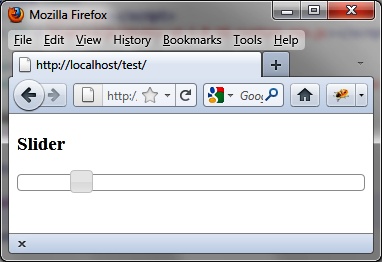
Figure 7-1. A slider in the HTML page
The use of the slider () method changes the appearance of HTML elements in the page, adding new CSS classes that give them the appropriate ...
Read now
Unlock full access


 O’Reilly covers everything we've got, with content to help us build a world-class technology community, upgrade the capabilities and competencies of our teams, and improve overall team performance as well as their engagement.I wanted to learn C and C++, but it didn't click for me until I picked up an O'Reilly book. When I went on the O’Reilly platform, I was astonished to find all the books there, plus live events and sandboxes so you could play around with the technology.I’ve been on the O’Reilly platform for more than eight years. I use a couple of learning platforms, but I'm on O'Reilly more than anybody else. When you're there, you start learning. I'm never disappointed.I'm always learning. So when I got on to O'Reilly, I was like a kid in a candy store. There are playlists. There are answers. There's on-demand training. It's worth its weight in gold, in terms of what it allows me to do.