May 2001
Beginner
384 pages
9h 37m
English
Graphical interfaces are driven by user events—mouse clicks and keystrokes. However, a running application can also receive events that don’t originate from the user interface: packets arriving over a network interface, periodic timers firing, an input device being plugged into a USB port, or a CD being inserted into an attached drive. In an object-oriented world, both types of events eventually result in a message being sent to an object in your application, as depicted in Figure 8.1. This chapter focuses on events—both user- and program-generated—and how, as a programmer, you intercept, handle, and coordinate them in Cocoa.
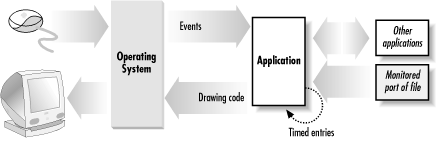
Figure 8-1. A Cocoa application receiving events
In this section you’ll explore the structure of a Cocoa application from a user-event-handling perspective. You’ll learn about the classes in the core program framework and delve into topics such as the view hierarchy, the event cycle, and the responder chain. Later you’ll build a simple application that responds to a user’s mouse click by drawing a colored dot in the application’s window.
Four classes are at the core of a running application: NSResponder, NSWindow, NSView, and NSApplication (Figure 8.2). Each class plays a critical role in the two primary activities of an application: drawing the user interface and responding ...
Read now
Unlock full access


 O’Reilly covers everything we've got, with content to help us build a world-class technology community, upgrade the capabilities and competencies of our teams, and improve overall team performance as well as their engagement.I wanted to learn C and C++, but it didn't click for me until I picked up an O'Reilly book. When I went on the O’Reilly platform, I was astonished to find all the books there, plus live events and sandboxes so you could play around with the technology.I’ve been on the O’Reilly platform for more than eight years. I use a couple of learning platforms, but I'm on O'Reilly more than anybody else. When you're there, you start learning. I'm never disappointed.I'm always learning. So when I got on to O'Reilly, I was like a kid in a candy store. There are playlists. There are answers. There's on-demand training. It's worth its weight in gold, in terms of what it allows me to do.