Skip to Content
Mastering OpenCV 4 with Python
book

Mastering OpenCV 4 with Python

by Alberto Fernández Villán
March 2019
Intermediate to advanced
532 pages
13h 2m
English
Packt Publishing
Content preview from Mastering OpenCV 4 with Python

Testing the installation

One way to test the installation is to execute an OpenCV Python script. In order to do it, you should have two files, logo.png and test_opencv_installation.py, in a specific folder:
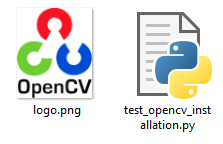
Open a cmd and go to the path where these two files are. Next, we can check the installation by typing the following:

python test_opencv_installation.py

You should see both the OpenCV RGB logo and the OpenCV grayscale logo:

In that case, the installation has been successful.

Become an O’Reilly member and get unlimited access to this title plus top books and audiobooks from O’Reilly and nearly 200 top publishers, thousands of courses curated by job role, 150+ live events each month,
and much more.
Start your free trial

You might also like

OpenCV 4 with Python Blueprints - Second Edition

OpenCV 4 with Python Blueprints - Second Edition

Dr. Menua Gevorgyan, Michael Beyeler (USD), Arsen Mamikonyan, Michael Beyeler
Learning OpenCV 3

Learning OpenCV 3

Adrian Kaehler, Gary Bradski
Machine Learning for OpenCV 4 - Second Edition

Machine Learning for OpenCV 4 - Second Edition

Aditya Sharma, Michael Beyeler (USD), Vishwesh Ravi Shrimali, Michael Beyeler

Publisher Resources

ISBN: 9781789344912Supplemental Content