June 2013
Beginner
926 pages
36h 13m
English
Photoshop gives you lots of ways to rotate, distort, and otherwise skew images, all mighty useful techniques to have in your bag of tricks. By rotating an image, you can add visual interest (as in the Polaroid technique on Adding Polaroid-Style Photo Frames), convert vertical elements to horizontal ones (or vice versa), and straighten crooked items. Distorting comes in handy when you want to slant an object or line of text or turn it slightly on its side, or if you want the object or text to fade into the distance with perspective. And the Puppet Warp tool lets you distort specific objects in an image while leaving the rest of it unchanged.
This chapter has touched on rotation here and there: You’ve learned how to rotate a crop box, rotate an image with the Free Transform command, and rotate the whole canvas. In this section, you’ll learn about simple rotations as well as the tougher stuff.
To learn how to reshape pixels using the Liquify filter and Puppet Warp tool, trot on over to Chapter 11.
The Image Rotation command, not surprisingly, rotates images. You can spin the whole document—layers and all—90 degrees (clockwise or counterclockwise), 180 degrees, or by an arbitrary amount (see Figure 7-24). You can also flip the canvas (or layer) horizontally or vertically.
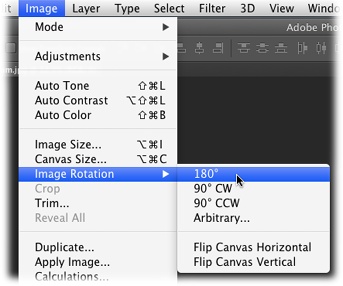
Figure 7-24. Choose Image→Image Rotation to view this handy menu of image- ...
Read now
Unlock full access


 O’Reilly covers everything we've got, with content to help us build a world-class technology community, upgrade the capabilities and competencies of our teams, and improve overall team performance as well as their engagement.I wanted to learn C and C++, but it didn't click for me until I picked up an O'Reilly book. When I went on the O’Reilly platform, I was astonished to find all the books there, plus live events and sandboxes so you could play around with the technology.I’ve been on the O’Reilly platform for more than eight years. I use a couple of learning platforms, but I'm on O'Reilly more than anybody else. When you're there, you start learning. I'm never disappointed.I'm always learning. So when I got on to O'Reilly, I was like a kid in a candy store. There are playlists. There are answers. There's on-demand training. It's worth its weight in gold, in terms of what it allows me to do.