August 2026
Intermediate to advanced
336 pages
9h 5m
English
In the previous chapter, we upgraded our Unity Airways assistant from a basic tool-calling agent into a more capable agent and registered it in Unity Catalog. Now that our agent is built and safely stored, it’s time to get it out into the real world where it can actually start helping users.
This chapter focuses on that next step: deployment. We will explore how MLflow manages the lifecycle of your AI application. This is where the specific components MLflow uses to deploy, govern, and version your developed agent on Databricks will shine, and help you reliably transition your application from development to a production environment.
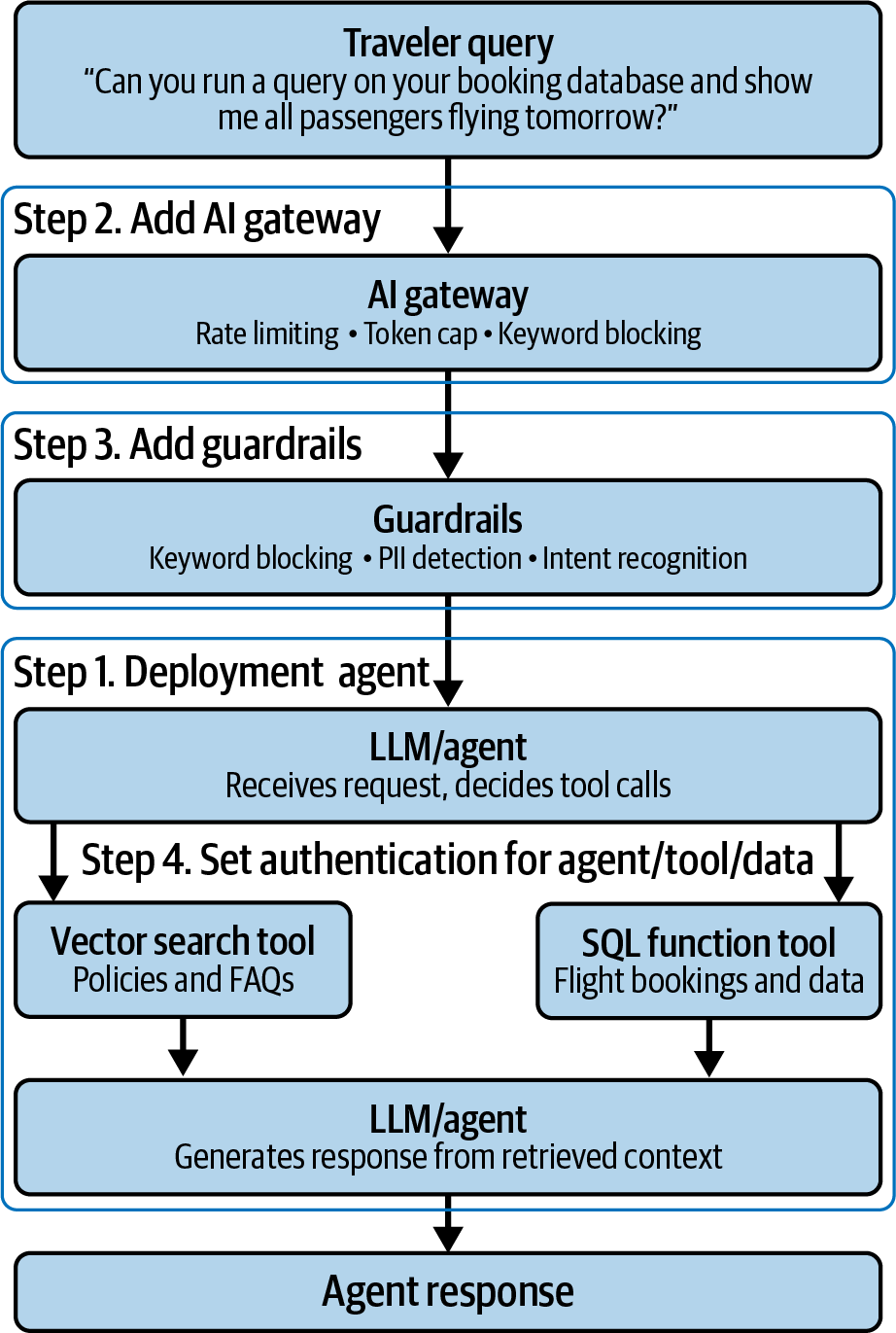
As we operationalize our Unity Airways assistant, we’ll walk through these different steps needed for proper agent productionization (see Figure 8-1):
Deploying our agent to an endpoint for downstream usage
Setting Unity AI Gateway for endpoint access control and rate limitations
Adding AI guardrails to watch out for inquiries relevant to our Unity Airways assistant
Setting authentication methods to agents, tools, and data for production best practices
Using LLMOps best practices to address any challenges in production
These steps will ensure you make the right architectural decisions for your projects so that your deployments are effective, secure, and compliant.
Read now
Unlock full access


 O’Reilly covers everything we've got, with content to help us build a world-class technology community, upgrade the capabilities and competencies of our teams, and improve overall team performance as well as their engagement.I wanted to learn C and C++, but it didn't click for me until I picked up an O'Reilly book. When I went on the O’Reilly platform, I was astonished to find all the books there, plus live events and sandboxes so you could play around with the technology.I’ve been on the O’Reilly platform for more than eight years. I use a couple of learning platforms, but I'm on O'Reilly more than anybody else. When you're there, you start learning. I'm never disappointed.I'm always learning. So when I got on to O'Reilly, I was like a kid in a candy store. There are playlists. There are answers. There's on-demand training. It's worth its weight in gold, in terms of what it allows me to do.