March 2011
Intermediate to advanced
552 pages
11h 54m
English
WHAT'S IN THIS CHAPTER?
Creating custom shortcode
Registering complex and parameterized shortcodes
Mastering advanced shortcode tips
Connecting your site with Google Maps
Shortcodes are WordPress-specific code that enables you to do nifty things with little effort, such as embed content or create objects that would normally require lots of complicated, ugly code.
In this chapter, you learn how to allow users of your plugins to enhance their posts with advanced customizable content using just a few characters.
This section teaches you what a shortcode is and how to create new shortcodes, from simple string replacements to advanced functions with parameters.
The Shortcode API enables creating simple macro codes, sometimes also referred to as bbcodes for their similarity with a popular syntax in various forums and bulletin boards.
In a nutshell, a shortcode is a simple tag syntax between square brackets, such as [something], used in posts. At render time when the post is displayed, the shortcode is dynamically replaced with a more complex and user-defined content. See Figure 10-1 for a simple example of a shortcode plugin that would substitute [date] with the current date and time.
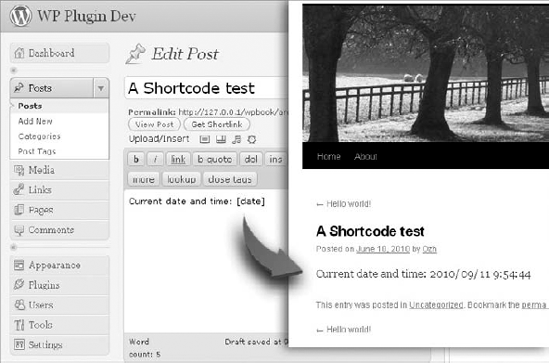
Figure 10.1. FIGURE 10-1
WordPress out-of-the-box registers shortcodes you can use: When you upload multiple images attached to a given post, you can ...
Read now
Unlock full access


 O’Reilly covers everything we've got, with content to help us build a world-class technology community, upgrade the capabilities and competencies of our teams, and improve overall team performance as well as their engagement.I wanted to learn C and C++, but it didn't click for me until I picked up an O'Reilly book. When I went on the O’Reilly platform, I was astonished to find all the books there, plus live events and sandboxes so you could play around with the technology.I’ve been on the O’Reilly platform for more than eight years. I use a couple of learning platforms, but I'm on O'Reilly more than anybody else. When you're there, you start learning. I'm never disappointed.I'm always learning. So when I got on to O'Reilly, I was like a kid in a candy store. There are playlists. There are answers. There's on-demand training. It's worth its weight in gold, in terms of what it allows me to do.