October 2008
Intermediate to advanced
1166 pages
28h 31m
English
When you open VS2008 for the first time, you’ll find yourself looking at the VS2008 Start Page, as shown in Figure 2-1. This contains links for creating new projects and websites and opening existing ones. It also contains several windows with links to helpful topics for getting started, as well as up-to-date news items.
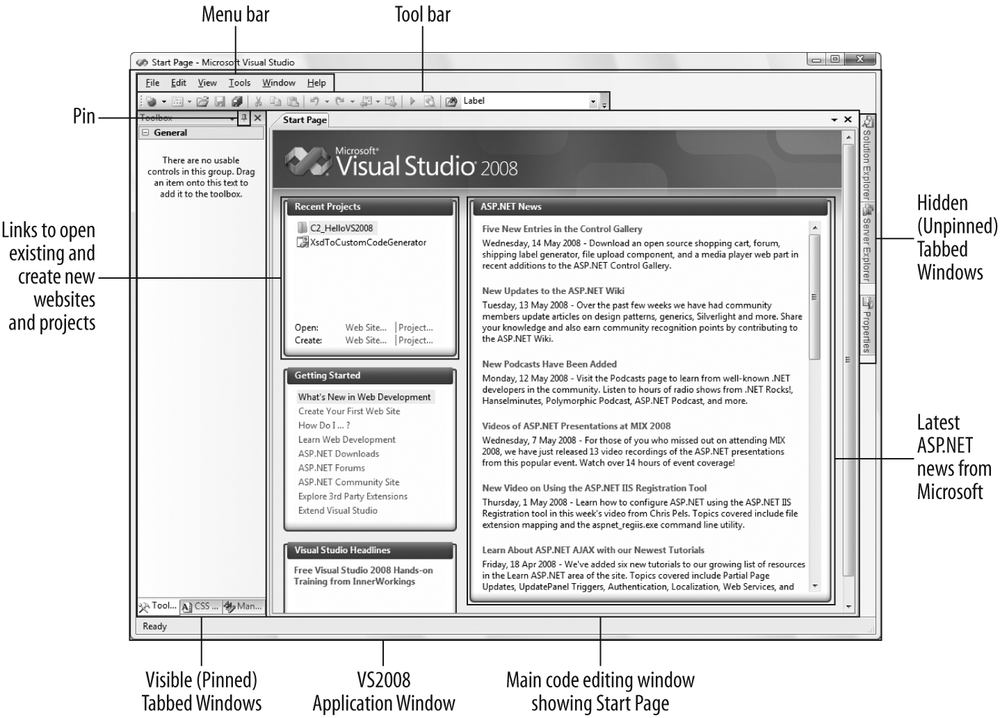
Figure 2-1. The Visual Studio 2008 Start Page
The Start Page opens in the main code-editing window inside VS2008. You can close it by clicking the X icon in the top-righthand corner or by pressing Alt-F, C. You can also disable it in the main Options dialog (Tools → Options) if you prefer not to see it at all.
The VS2008 application window surrounds the main window and is a typical collection of Windows menu items and buttons, plus several that are specific to the VS2008 integrated development environment (IDE). The left and right sides of the application window hold specialized tabs that provide access to tools and controls, and to other servers and databases in the development environment, labeled Toolbox and Server Explorer, respectively. The Solution Explorer, for exploring the files and classes associated with a particular project, appears on the right side. More windows are available through the VS2008 menu bar (see “The Integrated Development Environment,” later in this chapter).
Note that you can lock open, or “pin,” these tabs, as ...
Read now
Unlock full access


 O’Reilly covers everything we've got, with content to help us build a world-class technology community, upgrade the capabilities and competencies of our teams, and improve overall team performance as well as their engagement.I wanted to learn C and C++, but it didn't click for me until I picked up an O'Reilly book. When I went on the O’Reilly platform, I was astonished to find all the books there, plus live events and sandboxes so you could play around with the technology.I’ve been on the O’Reilly platform for more than eight years. I use a couple of learning platforms, but I'm on O'Reilly more than anybody else. When you're there, you start learning. I'm never disappointed.I'm always learning. So when I got on to O'Reilly, I was like a kid in a candy store. There are playlists. There are answers. There's on-demand training. It's worth its weight in gold, in terms of what it allows me to do.