February 2018
Beginner to intermediate
176 pages
3h 24m
English
You want the best experience for your users. With a mobile device packed with sensors, why not tap into the raw power of the machine running your code to deliver the best possible interaction? With a little bit of work, you can take advantage of the accelerometer, the GPS, the camera, and the hardware on the device. This chapter will survey some of the more common use cases and lessons learned managing the underlying hardware platform.
Whether you are snapping photos for a social media app or scanning a QR code in a corporate lobby, the device’s camera is one of the most powerful sensors at your disposal.
In some cases, a card or a modal screen with a button that triggers the hardware will help someone understand why they need to provide access like the two-step wireframe depicted in Figure 4-1. This permission flow is common in iOS applications, where permission requests can be delayed until they are required by the application.
The simulator can do some hardware testing; however, especially when dealing with camera data, there is no substitute for a real device.
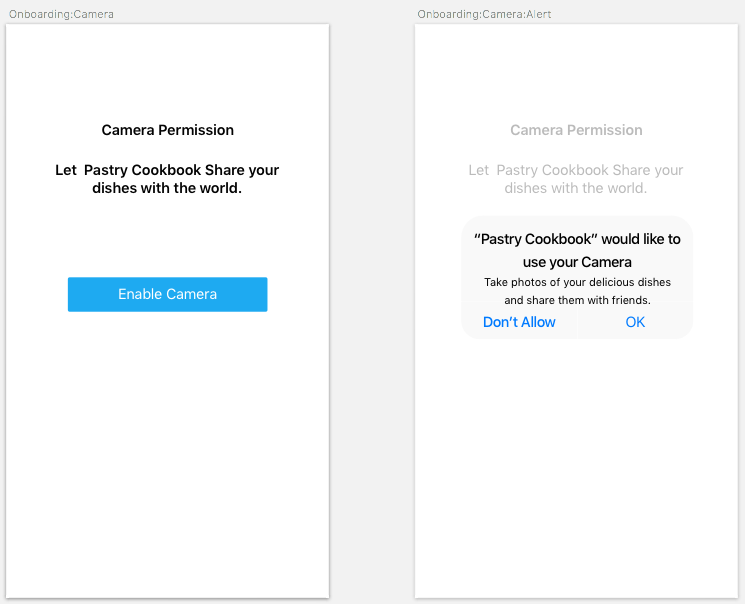
The Apple App Store will review your application and flag any permissions that have not been explicitly declared. ...
Read now
Unlock full access


 O’Reilly covers everything we've got, with content to help us build a world-class technology community, upgrade the capabilities and competencies of our teams, and improve overall team performance as well as their engagement.I wanted to learn C and C++, but it didn't click for me until I picked up an O'Reilly book. When I went on the O’Reilly platform, I was astonished to find all the books there, plus live events and sandboxes so you could play around with the technology.I’ve been on the O’Reilly platform for more than eight years. I use a couple of learning platforms, but I'm on O'Reilly more than anybody else. When you're there, you start learning. I'm never disappointed.I'm always learning. So when I got on to O'Reilly, I was like a kid in a candy store. There are playlists. There are answers. There's on-demand training. It's worth its weight in gold, in terms of what it allows me to do.