November 2012
Intermediate to advanced
496 pages
12h 2m
English
In this project, a 4-digit 7-segment display is connected to PORT D of the microcontroller. The project counts external events and displays the count on the display; for example, counting the number of items passing on a conveyor belt in front of a sensor. Leading zeroes are suppressed in the display. A push button switch STRT is used to clear and start the count.
In this project, the displays are refreshed inside a timer interrupt service routine in the background, so that the processor is free to do other tasks.
The block diagram of the project is shown in Figure 10.15. The 4-digit display pins a–g are connected in parallel and each digit is controlled separately. Counting starts when button STRT is pressed.
Figure 10.15 Block diagram of the project
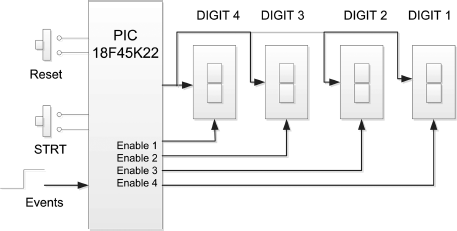
The circuit diagram of the project is shown in Figure 10.16. The displays are connected in parallel to PORT D of the microcontroller. Each digit is enabled separately by connecting a transistor as a switch to its common cathode pin, as in the earlier project. Setting the base of the transistor to logic HIGH turns the transistor ON and enables the display. PORT A pins RA0 to RA3 are used to control the display enable lines. The STRT push-button switch is connected to pin RA4 of the microcontroller. ...
Read now
Unlock full access


 O’Reilly covers everything we've got, with content to help us build a world-class technology community, upgrade the capabilities and competencies of our teams, and improve overall team performance as well as their engagement.I wanted to learn C and C++, but it didn't click for me until I picked up an O'Reilly book. When I went on the O’Reilly platform, I was astonished to find all the books there, plus live events and sandboxes so you could play around with the technology.I’ve been on the O’Reilly platform for more than eight years. I use a couple of learning platforms, but I'm on O'Reilly more than anybody else. When you're there, you start learning. I'm never disappointed.I'm always learning. So when I got on to O'Reilly, I was like a kid in a candy store. There are playlists. There are answers. There's on-demand training. It's worth its weight in gold, in terms of what it allows me to do.