February 2006
Intermediate to advanced
826 pages
63h 42m
English
The values for text-decoration
are fairly intuitive: underline
causes an element to be underlined, overline draws a line over the element, and
line-through draws a line through the
middle of the element and replaces the deprecated strike and s elements in HTML. text-decoration variations are shown in Figure 18-10.
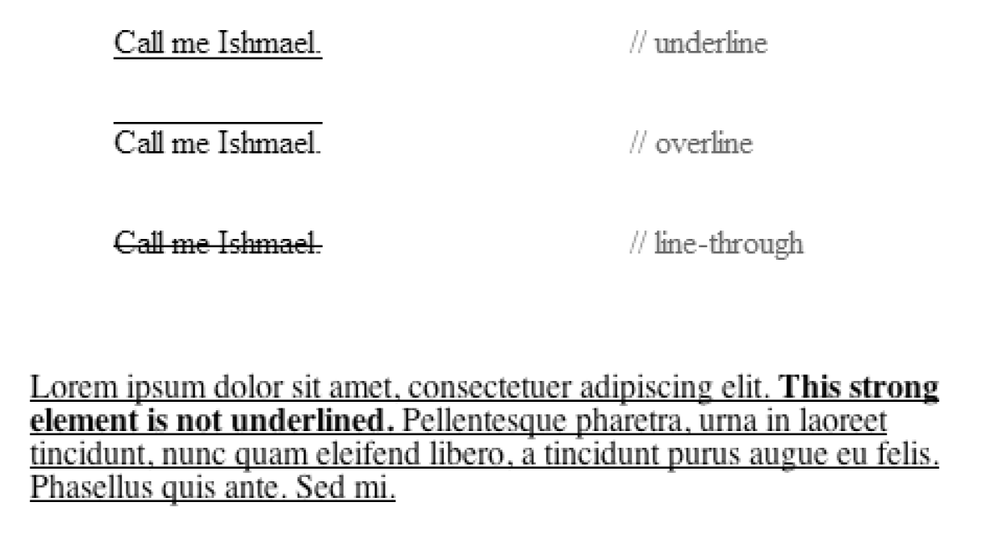
Figure 18-10. The text-decoration property
There is also an optional blink
value that causes the text to flash on and off like the dreaded Netscape
blink element (the blink value is deliberately still not
supported by Internet Explorer).
The text-decoration property
has one strange behavior you should be aware of. Although text-decoration values applied to a block
element are not inherited by the block’s child elements, the line gets
drawn through the child elements anyway. The line (such as an underline, overline, or line-through) will go through the inline
elements even if they explicitly have text-decoration set to none, as shown in this example and the bottom
of Figure 18-10.
    <p style="text-decoration: underline">Lorem ipsum dolor sit amet,
consectetuer adipiscing elit. <strong style="text-decoration: none">This strong
element is not underlined.</strong> Pellentesque pharetra, urna in laoreet
tincidunt, nunc quam eleifend libero, a tincidunt purus augue eu felis. Phasellus quis
ante. Sed mi. </p>
There is currently no way to turn decoration off for child elements. The solution ...