June 2005
Beginner to intermediate
372 pages
10h 1m
English
OpenEV has a variety of simple and complex tools. Many of the advanced tools have been designed with raster data in mind, but the basic toolsets and controls include many of the features needed to do quick visualization of both raster and vector data.
One the first things you will want to do is zoom in to certain
portions of your map. There are a couple ways to do this. The first is
to use the plus and minus buttons on the toolbar of the view. The
icons are a magnifying glass with a + and -
symbol inside them. Clicking +
zooms into the center of the screen, and clicking - zooms out from the center of the
screen.
The more efficient way is to use the Zoom tool, which allows you to drag a rectangle on the screen and zoom in to that portion of the map. To enable the zoom tool, select the Edit Toolbar from the Edit menu, then choose Zoom from the list, as shown in Figure 8-6.
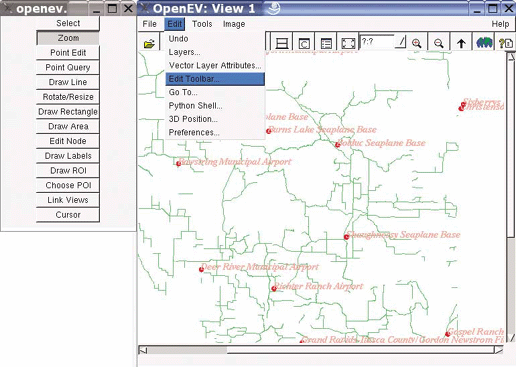
Figure 8-6. Activating the zoom tool
Now you can return to the view and click and hold the left mouse button to zoom in. You can also drag a rectangle around a portion of the screen and have it zoom in directly to that location. To do this, click and hold the left mouse button, then drag the mouse to another location. Watch as the rectangular zoom box appears, as in Figure 8-7. When the box covers the area you want, let go of the mouse button.
Zooming out can be done a few ways as well. As mentioned ...
Read now
Unlock full access


 O’Reilly covers everything we've got, with content to help us build a world-class technology community, upgrade the capabilities and competencies of our teams, and improve overall team performance as well as their engagement.I wanted to learn C and C++, but it didn't click for me until I picked up an O'Reilly book. When I went on the O’Reilly platform, I was astonished to find all the books there, plus live events and sandboxes so you could play around with the technology.I’ve been on the O’Reilly platform for more than eight years. I use a couple of learning platforms, but I'm on O'Reilly more than anybody else. When you're there, you start learning. I'm never disappointed.I'm always learning. So when I got on to O'Reilly, I was like a kid in a candy store. There are playlists. There are answers. There's on-demand training. It's worth its weight in gold, in terms of what it allows me to do.