June 2005
Beginner to intermediate
372 pages
10h 1m
English
MapServer map files are still a key component to writing a MapScript-based application. If you have a map file ready to use, you can start accessing and manipulating it right away. However, a powerful feature of MapScript is the ability to create maps on the fly without having a map file. In this case, you can build your map from scratch.
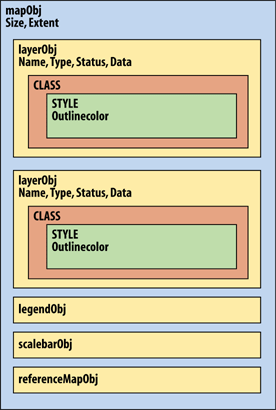
Figure 14-1. The MapScript API's hierarchical object structure
In the first two examples, a simple map file is used, as shown in Example 14-1. In the third example, a custom map file is created using MapScript. To keep the example short and simple, I've removed optional components like the scale bar, legend, and reference map.
Example 14-1. A simple map file used for the examples in this chapter
MAP
  SIZE 600 300
  EXTENT -180 -90 180 90
  IMAGECOLOR 180 180 250
  IMAGETYPE PNG

  UNITS DD
  WEB
    IMAGEPATH "/srv/www/htdocs/tmp/"
    IMAGEURL "/tmp/"
  END

  LAYER
    NAME countries
    TYPE POLYGON
    STATUS DEFAULT
    DATA countries_simpl
    CLASS
      NAME 'Countries'
      OUTLINECOLOR 100 100 100
      COLOR 200 200 200
    END
  END
ENDYou can download the country boundary data in shapefile format from http://ftp.intevation.de/freegis/worlddata/freegis_worlddata-0.1_simpl.tar.gz.
This compressed file contains a shapefile called countries_simpl. The map file example assumes that the countries_simpl.* files are in the same folder as the map file. This dataset is used elsewhere in this book. ...
Read now
Unlock full access


 O’Reilly covers everything we've got, with content to help us build a world-class technology community, upgrade the capabilities and competencies of our teams, and improve overall team performance as well as their engagement.I wanted to learn C and C++, but it didn't click for me until I picked up an O'Reilly book. When I went on the O’Reilly platform, I was astonished to find all the books there, plus live events and sandboxes so you could play around with the technology.I’ve been on the O’Reilly platform for more than eight years. I use a couple of learning platforms, but I'm on O'Reilly more than anybody else. When you're there, you start learning. I'm never disappointed.I'm always learning. So when I got on to O'Reilly, I was like a kid in a candy store. There are playlists. There are answers. There's on-demand training. It's worth its weight in gold, in terms of what it allows me to do.