December 2012
Intermediate to advanced
488 pages
10h 23m
English
In this section, we'll discard the premade dialogs and create our own. This should give you a much deeper understanding of how things work.
For these first exercises, you'll have to ignore some of WiX's warnings. Go to the Properties page for the project, select Tools Settings and add a rule to ignore the validation test ICE20. This test checks that you've added the FilesInUse, Error, FatalError, UserExit, and Exit dialogs. That's a lot to start out with, so for now just ignore those rules.
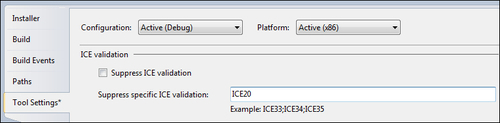
What are these dialogs? They are all windows that show an error message or indicate that the install has been completed successfully. ...
Read now
Unlock full access


 O’Reilly covers everything we've got, with content to help us build a world-class technology community, upgrade the capabilities and competencies of our teams, and improve overall team performance as well as their engagement.I wanted to learn C and C++, but it didn't click for me until I picked up an O'Reilly book. When I went on the O’Reilly platform, I was astonished to find all the books there, plus live events and sandboxes so you could play around with the technology.I’ve been on the O’Reilly platform for more than eight years. I use a couple of learning platforms, but I'm on O'Reilly more than anybody else. When you're there, you start learning. I'm never disappointed.I'm always learning. So when I got on to O'Reilly, I was like a kid in a candy store. There are playlists. There are answers. There's on-demand training. It's worth its weight in gold, in terms of what it allows me to do.