July 2006
Beginner
910 pages
20h 14m
English
In This Chapter
✓ | Dealing with errors |
✓ | Using the debugger |
✓ | Stepping through your code |
✓ | Using breakpoints |
✓ | Working with Response.Write |
Visual Web Developer includes a variety of built-in debugging features that can help you track down the nasty bugs that are sure to creep into your application. With the applications we’ve presented so far, it’s hard for anything to go wrong because the applications don’t really do any significant work. So, this section starts by presenting a simple calculator application that we can use to explore Visual Web Developer’s debugging features.

All code listings used in this book are available for download at www.dummies.com/go/aspnetaiofd.
Figure 6-1 shows a simple Web page that accepts two numbers as input and displays the sum of the numbers when the user clicks the button. I’ll use this simple program as an example for the debugging features presented in this chapter.
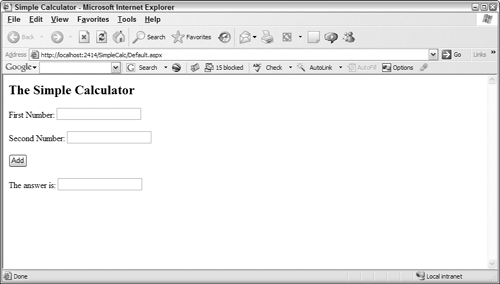
Figure 6-1. A Simple Calculator program in action.
The .aspx file for this page is shown in Listing 6-1. Listing 6-2 shows the version of the code-behind file for this page. Note that although this program is shown in C#, the same debugging skills apply just as easily to Visual Basic.
Example 6-1. The Default.aspx ...
Read now
Unlock full access


 O’Reilly covers everything we've got, with content to help us build a world-class technology community, upgrade the capabilities and competencies of our teams, and improve overall team performance as well as their engagement.I wanted to learn C and C++, but it didn't click for me until I picked up an O'Reilly book. When I went on the O’Reilly platform, I was astonished to find all the books there, plus live events and sandboxes so you could play around with the technology.I’ve been on the O’Reilly platform for more than eight years. I use a couple of learning platforms, but I'm on O'Reilly more than anybody else. When you're there, you start learning. I'm never disappointed.I'm always learning. So when I got on to O'Reilly, I was like a kid in a candy store. There are playlists. There are answers. There's on-demand training. It's worth its weight in gold, in terms of what it allows me to do.