May 2011
Beginner
560 pages
15h 25m
English
In previous sections of this chapter, I help you gain some plotting confidence. Those sections show you how to create scaled, monochrome plots with uniform lineweights in model space or paper space. Those skills may be all you need, but if you care about controlling plotted lineweights and colors or adding special effects such as screening (plotting shades of gray), read on.
Plot styles provide a way to override object properties with alternative plot properties. (See Chapter 6 for information about object properties.) The properties include plotted lineweight, plotted color, and screening (plotting shades of gray). Figure 16-7 shows the full range of options. Plot styles come in two exciting flavors:
Color-dependent plot styles are based on the standard way of plotting in earlier versions of AutoCAD (before AutoCAD 2000), whereas named plot styles provide a newer way.
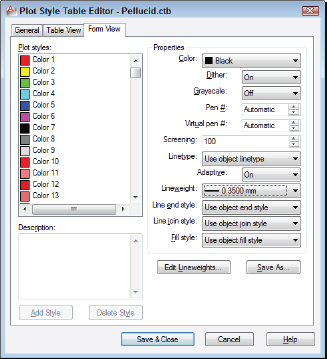
Figure 16-7: Editing a color-dependent plot style table.
It's remotely possible that you won't need to bother with plot styles. If the drawings you want to plot have layer and object properties (especially lineweight) that reflect how you want objects to plot, you can dispense with plot styles. But most people and most drawings use plot styles, so you should at least be familiar with them.
A couple of common reasons ...
Read now
Unlock full access


 O’Reilly covers everything we've got, with content to help us build a world-class technology community, upgrade the capabilities and competencies of our teams, and improve overall team performance as well as their engagement.I wanted to learn C and C++, but it didn't click for me until I picked up an O'Reilly book. When I went on the O’Reilly platform, I was astonished to find all the books there, plus live events and sandboxes so you could play around with the technology.I’ve been on the O’Reilly platform for more than eight years. I use a couple of learning platforms, but I'm on O'Reilly more than anybody else. When you're there, you start learning. I'm never disappointed.I'm always learning. So when I got on to O'Reilly, I was like a kid in a candy store. There are playlists. There are answers. There's on-demand training. It's worth its weight in gold, in terms of what it allows me to do.