August 2011
Beginner
287 pages
6h 44m
English
SENDING SMS MESSAGES TO THE EMULATOR
You can emulate sending SMS messages to the Android emulator using either the Dalvik Debug Monitor Service (DDMS) tool available in Eclipse, or the Telnet client.

NOTE The Telnet client is not installed by default in Windows 7. To install it, type the following command line in the Windows command prompt: pkgmgr /iu:”TelnetClient”.
Take a look at how this is done in Telnet. First, ensure that the Android emulator is running. In order to telnet to the emulator, you need to know the port number of the emulator. You can obtain this by looking at the title bar of the Android emulator window. It normally starts with 5554, with each subsequent emulator having a port number incremented by two, such as 5556, 5558, and so on. Assuming that you currently have one Android emulator running, you can telnet to it using the following command (replace 5554 with the actual number of your emulator):
C:\telnet localhost 5554
To send an SMS message to the emulator, use the following command:
sms send +651234567 Hello my friend!
The syntax of the sms send command is as follows:
sms send <phone_number> <message>
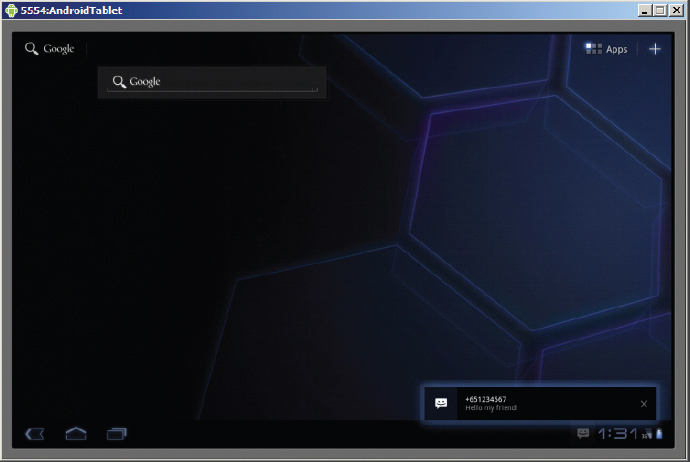
Figure B-19 shows the emulator receiving the sent SMS message.
Besides using Telnet for sending SMS messages, you can also use the DDMS ...
Read now
Unlock full access


 O’Reilly covers everything we've got, with content to help us build a world-class technology community, upgrade the capabilities and competencies of our teams, and improve overall team performance as well as their engagement.I wanted to learn C and C++, but it didn't click for me until I picked up an O'Reilly book. When I went on the O’Reilly platform, I was astonished to find all the books there, plus live events and sandboxes so you could play around with the technology.I’ve been on the O’Reilly platform for more than eight years. I use a couple of learning platforms, but I'm on O'Reilly more than anybody else. When you're there, you start learning. I'm never disappointed.I'm always learning. So when I got on to O'Reilly, I was like a kid in a candy store. There are playlists. There are answers. There's on-demand training. It's worth its weight in gold, in terms of what it allows me to do.