June 2022
Intermediate to advanced
260 pages
5h 34m
English
In the previous chapter, you learned how to deploy Consul on Kubernetes or VMs. The next step to using Consul is to add your services into the mesh. From there, you will be able to use Consul to increase security, observability, and reliability.
A service is “added to the mesh” by registering it with Consul, deploying its sidecar proxy, and ensuring that all communication is routed through that proxy. On Kubernetes, this is done via a simple pod annotation. On VMs, you have a bit more work to do: you need to register your service with Consul, deploy its sidecar proxy, and configure routing.
This chapter and subsequent chapters use an example application I built for the book to illustrate Consul’s functionality. After following the exercises with the example application, you will be well equipped to add your own services to the mesh.
To try out the service mesh, you first need some services. You’re going to deploy a basic application called Birdwatcher. Birdwatcher consists of two microservices: frontend and backend.
The frontend service hosts a UI as shown in Figure 4-1. Every time you click Shuffle, a new bird is shown.
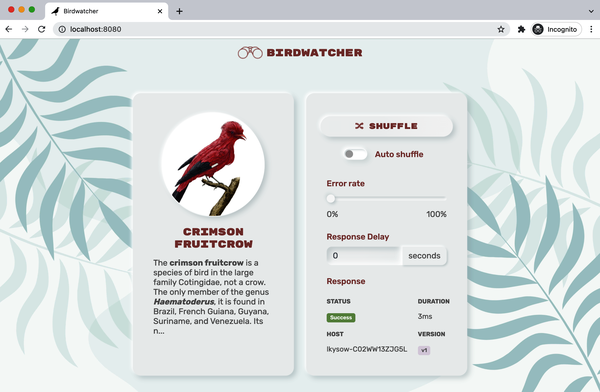
frontend service hosts the UI for the Birdwatcher serviceThe frontend service uses the backend service’s API to retrieve new birds. Whenever frontend makes a call to backend ...
Read now
Unlock full access


 O’Reilly covers everything we've got, with content to help us build a world-class technology community, upgrade the capabilities and competencies of our teams, and improve overall team performance as well as their engagement.I wanted to learn C and C++, but it didn't click for me until I picked up an O'Reilly book. When I went on the O’Reilly platform, I was astonished to find all the books there, plus live events and sandboxes so you could play around with the technology.I’ve been on the O’Reilly platform for more than eight years. I use a couple of learning platforms, but I'm on O'Reilly more than anybody else. When you're there, you start learning. I'm never disappointed.I'm always learning. So when I got on to O'Reilly, I was like a kid in a candy store. There are playlists. There are answers. There's on-demand training. It's worth its weight in gold, in terms of what it allows me to do.