June 2005
Beginner
463 pages
14h 19m
English
Determine an item’s current market value using eBay’s Completed Items search and set your price accordingly.
On eBay, research is money. A seller who knows how much an item is worth will be able to choose the selling options more appropriately, and as a result, get more money. And a buyer who knows the worth of an item will more readily recognize a good deal and as a result, spend less money. Fortunately, there are tools at your disposal to help determine an item’s worth in about 20 seconds flat.
Any item on eBay is worth only what someone is willing to pay for it. Fortunately, for almost every item sold on eBay, an identical or similar item will have been sold within the last month or two. And given the public nature of eBay’s past auctions, it’s easy to find out the health of the current market for your item before you list it.
Start with a standard search (see Chapter 2), and locate any auctions for items similar to the one you’re selling. Click "Completed listings” in the Display box as shown in Figure 4-1, and then select “highest first” to sort the listing by final price in descending order. Note that eBay’s Completed Listings search is a title only search (descriptions of closed auctions aren’t indexed), so you’ll typically want to use simpler (broader) search queries than you’d use for active items.
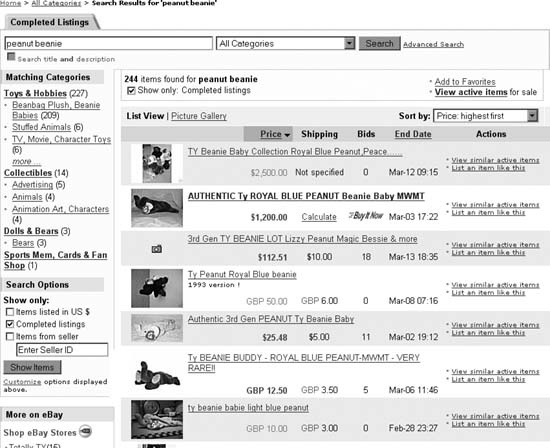
Figure 4-1. A quick search through recently ...
Read now
Unlock full access


 O’Reilly covers everything we've got, with content to help us build a world-class technology community, upgrade the capabilities and competencies of our teams, and improve overall team performance as well as their engagement.I wanted to learn C and C++, but it didn't click for me until I picked up an O'Reilly book. When I went on the O’Reilly platform, I was astonished to find all the books there, plus live events and sandboxes so you could play around with the technology.I’ve been on the O’Reilly platform for more than eight years. I use a couple of learning platforms, but I'm on O'Reilly more than anybody else. When you're there, you start learning. I'm never disappointed.I'm always learning. So when I got on to O'Reilly, I was like a kid in a candy store. There are playlists. There are answers. There's on-demand training. It's worth its weight in gold, in terms of what it allows me to do.