September 2014
Beginner
686 pages
20h 43m
English
Since the earliest days of the web, forms have made it possible for websites to collect information from their visitors. Forms can gather email addresses for a newsletter, collect shipping information to complete an online sale, or simply receive visitor feedback. Forms also require your site’s visitors to think: read labels, type information, make selections, and so on. Because some sites depend entirely on receiving form data—Amazon wouldn’t be in business long if people couldn’t use forms to order books—web designers need to know how to make their forms as easy to use as possible. Fortunately, JavaScript’s ability to inject interactivity into forms can help you build forms that are easier to use and ensure more accurate visitor responses.
HTML provides a variety of tags to build a web form like the one pictured in Figure 8-1. The most important tag is the <form> tag, which defines the beginning (the opening <form> tag) and the end (the closing </form> tag) of the form. It also indicates what type of method the form uses to send data (post or get), and specifies where on the web the form data should be sent.
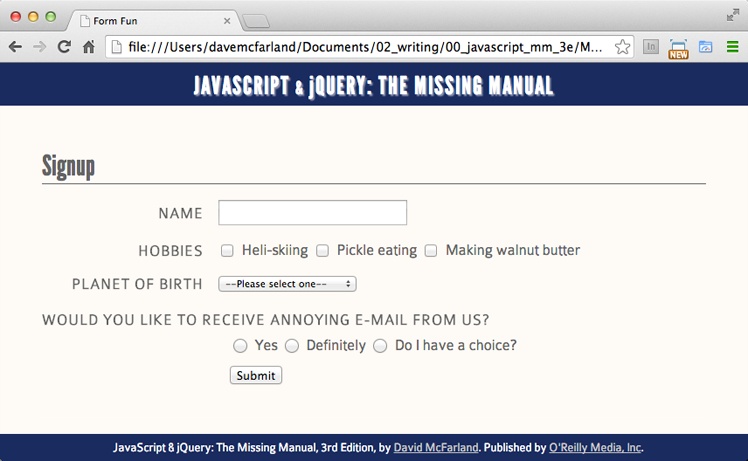
Figure 8-1. A basic form can include many different types of controls, including text fields, radio buttons, checkboxes, menu lists, submit buttons, and so on. For a list of HTML form fields and articles on how to use them, visit ...
Read now
Unlock full access


 O’Reilly covers everything we've got, with content to help us build a world-class technology community, upgrade the capabilities and competencies of our teams, and improve overall team performance as well as their engagement.I wanted to learn C and C++, but it didn't click for me until I picked up an O'Reilly book. When I went on the O’Reilly platform, I was astonished to find all the books there, plus live events and sandboxes so you could play around with the technology.I’ve been on the O’Reilly platform for more than eight years. I use a couple of learning platforms, but I'm on O'Reilly more than anybody else. When you're there, you start learning. I'm never disappointed.I'm always learning. So when I got on to O'Reilly, I was like a kid in a candy store. There are playlists. There are answers. There's on-demand training. It's worth its weight in gold, in terms of what it allows me to do.