April 2003
Intermediate to advanced
304 pages
7h 48m
English
This section builds a Mac OS X application from scratch. It will start with the base SimpleEdit JAR file that was built in Chapter 4 and Chapter 5, and then add the necessary elements to convert it to a full Mac OS X application bundle. It will build out the directory structure shown in Figure 7-5; you might want to refer to this figure as you walk through this example.
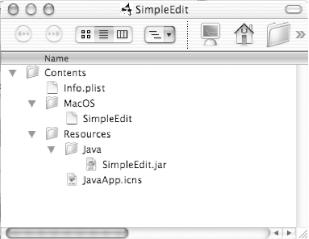
Figure 7-5. Minimal directory structure
Create a new folder called
SimpleEdit in your home directory
(~) by using the Finder. Add a folder inside this
new directory called Contents
. This is where you’ll
add the Info.plist file. Next,
create a MacOS
folder (no space) inside the Contents directory. Here, add a
“stub” file that acts as a native
launcher stub for the application.
Create a Resources folder inside Contents. This is where you will add an icns file, an icon that will be displayed in the Finder and standard file dialogs. Finally, add a Java directory to the Resources folder. This is where you’ll put the required Java libraries (JAR files).
Directly inside the Contents folder, add an Info.plist file with the contents shown back in Example 7-2.
Several of the properties are already set, including the main class and some arguments passed in to load SimpleEdit plug-ins (specifically, the SimpleEdit plug-ins developed in Chapter 9). Understanding ...
Read now
Unlock full access


 O’Reilly covers everything we've got, with content to help us build a world-class technology community, upgrade the capabilities and competencies of our teams, and improve overall team performance as well as their engagement.I wanted to learn C and C++, but it didn't click for me until I picked up an O'Reilly book. When I went on the O’Reilly platform, I was astonished to find all the books there, plus live events and sandboxes so you could play around with the technology.I’ve been on the O’Reilly platform for more than eight years. I use a couple of learning platforms, but I'm on O'Reilly more than anybody else. When you're there, you start learning. I'm never disappointed.I'm always learning. So when I got on to O'Reilly, I was like a kid in a candy store. There are playlists. There are answers. There's on-demand training. It's worth its weight in gold, in terms of what it allows me to do.