April 2003
Intermediate to advanced
304 pages
7h 48m
English
MRJAppBuilder is a utility that packages already-compiled Java applications to run as Mac OS X applications. When you first convert your application to Mac OS X, it may be useful to create a skeleton application with MRJAppBuilder rather than creating one from scratch, as described in the last section. However, MRJAppBuilder has a serious limitation—once you’ve used the utility to generate your application wrapper and quit MRJAppBuilder, you’ll have to make changes by hand or re-enter everything.
JDK 1.4.1 includes a very similar replacement to MRJAppBuilder called "Jar Bundler.” The steps for using Jar Bundler are very similar to those for MRJAppBuilder.
MRJAppBuilder can be found in your /Developer/Applications directory. When you launch the application, you’ll see the interface shown in Figure 7-9.
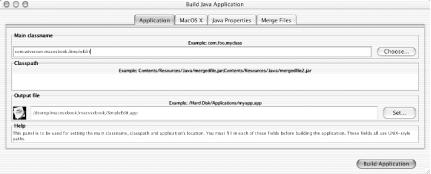
Figure 7-9. MRJAppBuilder main properties
Technically, the information in the
“Application” pane is all you need
to make a Mac OS X application. All three fields are required. The
“Main
classname” field lets you specify the fully
qualified class that contains the main( )
method you want executed on application startup. This field
represents the value of the property
com.apple.mrj.application.main
(in effect, it sets the
MainClass key). Whatever JAR file you select when
you follow the dialog is added to the
“Classpath” field automatically.
If you want to use JAR or ...
Read now
Unlock full access


 O’Reilly covers everything we've got, with content to help us build a world-class technology community, upgrade the capabilities and competencies of our teams, and improve overall team performance as well as their engagement.I wanted to learn C and C++, but it didn't click for me until I picked up an O'Reilly book. When I went on the O’Reilly platform, I was astonished to find all the books there, plus live events and sandboxes so you could play around with the technology.I’ve been on the O’Reilly platform for more than eight years. I use a couple of learning platforms, but I'm on O'Reilly more than anybody else. When you're there, you start learning. I'm never disappointed.I'm always learning. So when I got on to O'Reilly, I was like a kid in a candy store. There are playlists. There are answers. There's on-demand training. It's worth its weight in gold, in terms of what it allows me to do.