Skip to Content
Mastering Vim
book

Mastering Vim

by Ruslan Osipov
November 2018
Beginner
330 pages
7h 21m
English
Packt Publishing
Content preview from Mastering Vim

Resolving a merge conflict

Start the Git merge tool (which is vimdiff, since we configured it earlier):

$ git mergetool

You will be treated to quite a light show, with four windows and a lot of colors thrown at you:
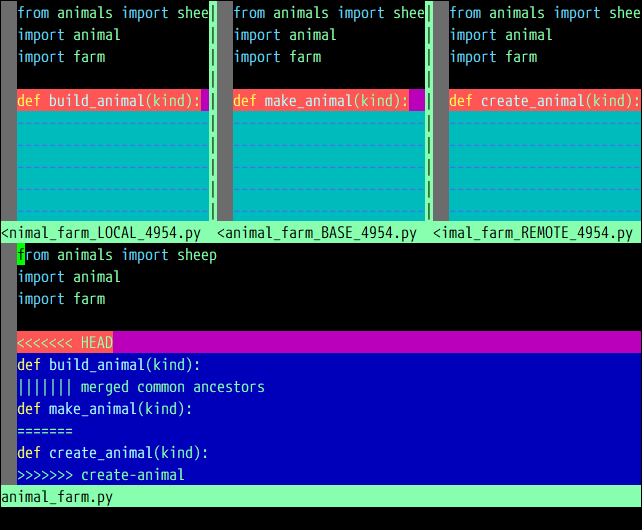
It's okay to be scared, but it's not as terrifying as it looks.

Local changes (master branch in this case) are in the upper-left window, followed by a closest common ancestor and the create-animal branch in the upper-right corner. The result of the merge is in the bottom window.

To get into more detail, from left to right, top to bottom:

  • LOCAL: This is file from the current branch (or whatever you're merging into)
  • BASE:
Become an O’Reilly member and get unlimited access to this title plus top books and audiobooks from O’Reilly and nearly 200 top publishers, thousands of courses curated by job role, 150+ live events each month,
and much more.
Start your free trial

You might also like

Mastering Vim

Mastering Vim

Damian Conway
Vim Masterclass

Vim Masterclass

Jason Cannon
Modern Vim

Modern Vim

Drew Neil

Publisher Resources

ISBN: 9781789341096Supplemental Content