Skip to Content
.NET Windows® Forms Custom Controls
book

.NET Windows® Forms Custom Controls

by Richard Weeks
January 2002
Intermediate to advanced
288 pages
5h 48m
English
Sams
Content preview from .NET Windows® Forms Custom Controls

Adding a Toolbox Bitmap

Before this chapter ends, I'd like to add a Toolbox bitmap for the IconButton. A Toolbox bitmap is the 16×16 image that appears in the Toolbox tab for the IconButton. Adding a bitmap for a control is a simple task, to say the least. All that needs to be done is to add a bitmap with the same name as the control to the project. Figure 3.7 shows the Solution with the IconButton.bmp file added in the Controls folder of the Solution.
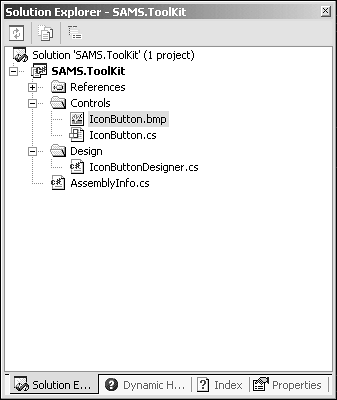
Figure 3.7. The IconButton.bmp file.

The bitmap must reside in the same namespace as the control and be compiled as an embedded resource. The Toolbox uses this as the default search for locating ...

Become an O’Reilly member and get unlimited access to this title plus top books and audiobooks from O’Reilly and nearly 200 top publishers, thousands of courses curated by job role, 150+ live events each month,
and much more.
Start your free trial

You might also like

Pro .NET 5 Custom Libraries: Implementing Custom .NET Data Types

Pro .NET 5 Custom Libraries: Implementing Custom .NET Data Types

Roger Villela
Professional C# 5.0 and .NET 4.5.1

Professional C# 5.0 and .NET 4.5.1

Christian Nagel, Jay Glynn, Morgan Skinner

Publisher Resources

ISBN: 0672323338Purchase book