October 2004
Intermediate to advanced
304 pages
7h 44m
English
Don't wait for the floppy disk or CD-ROM to time out before the system boots.
One advantage of modern BIOS and hardware capabilities is that they allow you to boot up from something other than a diskette or hard drive. BIOS can now fetch and run an operating system from an appropriately capable and configured LAN adapter or a bootable CD-ROM. You can tell the BIOS which devices it should try to boot up from, and in what order.
For a faster boot time you probably want your hard drive to be the first device in the list, as shown in Figure 1-8, ignoring the presence of diskettes or bootable CD-ROMs, although some BIOSes will detect the presence of a bootable CD-ROM and offer the option of booting off the CD regardless of the boot device order you set. Skipping the process of looking for a bootable diskette or CD-ROM by telling the BIOS to boot from the IDE hard drive first can shave anywhere from a few seconds to tens of seconds off your boot time.
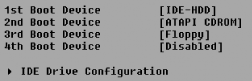
Figure 1-8. Booting from your IDE hard drive first saves time
If you do choose to put the hard drive first in the boot order, you will not be able to boot up from a diskette or CD-ROM. You can come back to this parameter to change the boot device order to boot from a device other than the hard drive, as shown in Figure 1-9, when you need to run a diagnostic program, load a new image onto the hard drive using ...
Read now
Unlock full access


 O’Reilly covers everything we've got, with content to help us build a world-class technology community, upgrade the capabilities and competencies of our teams, and improve overall team performance as well as their engagement.I wanted to learn C and C++, but it didn't click for me until I picked up an O'Reilly book. When I went on the O’Reilly platform, I was astonished to find all the books there, plus live events and sandboxes so you could play around with the technology.I’ve been on the O’Reilly platform for more than eight years. I use a couple of learning platforms, but I'm on O'Reilly more than anybody else. When you're there, you start learning. I'm never disappointed.I'm always learning. So when I got on to O'Reilly, I was like a kid in a candy store. There are playlists. There are answers. There's on-demand training. It's worth its weight in gold, in terms of what it allows me to do.