October 2004
Intermediate to advanced
304 pages
7h 44m
English
Setting the AGP aperture size is not a performance boost, but it will let your AGP adapter work to its maximum rendering and display capabilities.
AGP aperture size is a value in BIOS setup, shown in Figure 7-3, that establishes a range of memory-addressing space that may be used for video texturing. It does not:
Immediately set aside the amount of memory the aperture size is set for.
Need to be set proportionate to the amount of system RAM.
Have a direct correlation to video performance.
Additionally, it may be set lower than the amount of RAM on your video card.
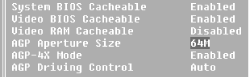
Figure 7-3. BIOS setup parameters for AGP aperture size
When your operating system initializes for an AGP video card, it maps the aperture to a collection of 4 KB pages of main memory. This memory may never be used as you work with your PC, some of it may be used from time to time, or all of it may be used, depending on how graphic-intensive your applications are. These memory blocks are not one big chunk of system memory carved out all at once, nor are they all in one section of memory. Instead, they are fragments, but AGP requires its memory to be addressed as a continuous block—and this block is the AGP aperture, a range of memory above that of the physical system memory used to give AGP its required continuous addressing block to work with. Generally, the AGP aperture may ...
Read now
Unlock full access


 O’Reilly covers everything we've got, with content to help us build a world-class technology community, upgrade the capabilities and competencies of our teams, and improve overall team performance as well as their engagement.I wanted to learn C and C++, but it didn't click for me until I picked up an O'Reilly book. When I went on the O’Reilly platform, I was astonished to find all the books there, plus live events and sandboxes so you could play around with the technology.I’ve been on the O’Reilly platform for more than eight years. I use a couple of learning platforms, but I'm on O'Reilly more than anybody else. When you're there, you start learning. I'm never disappointed.I'm always learning. So when I got on to O'Reilly, I was like a kid in a candy store. There are playlists. There are answers. There's on-demand training. It's worth its weight in gold, in terms of what it allows me to do.