July 2010
Beginner to intermediate
383 pages
9h 44m
English
WHAT'S IN THIS CHAPTER?
Understanding windows, views, and controllers
Displaying data and editing controls
Using a toolbar
Navigating with tabs
The Interface Builder Objects Library divides the Cocoa Touch controls into four groups: Controllers; Data Views; Inputs & Values; and Windows, Views & Bars. The Inputs & Values objects were introduced in Chapter 3, and a few other objects like Tables, Maps, and Image-related controls appear in Chapters 6, 7, and 10.
These are the remaining classes, which you are going to learn about in this chapter:
Controllers
UIViewController
UINavigationController
UITabBarController
UIToolBarController
Data Views
UIWebView
UITextView
UIScrollView
UIPickerView
UIDatePicker
Windows, Views & Bars
UIWindow
UIView
UINavigationBar
UINavigationItem
UIToolbar
UIBarButtonItem
UITabBar
UITabBarItem
Figure 4-1 shows how each of these classes appear in Interface Builder, so you know where to find them.
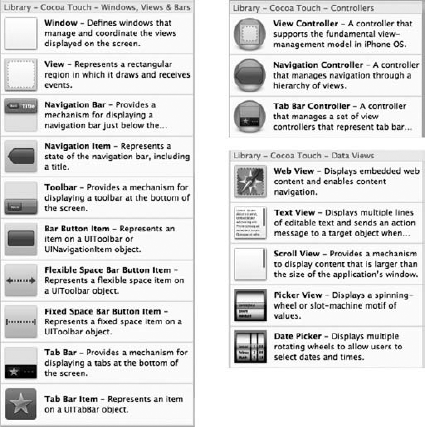
Figure 4-1. FIGURE 4-1
Windows and views form the underpinnings of all iPhone OS applications. They are the basis of the layout system and capture and handle user input. The UIWindow class in the iPhone OS is relatively simple and won't require a great deal of customization while UIView and its subclasses form the basis of every piece of your user interface.
An iPhone OS application generally has only one window — it provides the background upon ...
Read now
Unlock full access


 O’Reilly covers everything we've got, with content to help us build a world-class technology community, upgrade the capabilities and competencies of our teams, and improve overall team performance as well as their engagement.I wanted to learn C and C++, but it didn't click for me until I picked up an O'Reilly book. When I went on the O’Reilly platform, I was astonished to find all the books there, plus live events and sandboxes so you could play around with the technology.I’ve been on the O’Reilly platform for more than eight years. I use a couple of learning platforms, but I'm on O'Reilly more than anybody else. When you're there, you start learning. I'm never disappointed.I'm always learning. So when I got on to O'Reilly, I was like a kid in a candy store. There are playlists. There are answers. There's on-demand training. It's worth its weight in gold, in terms of what it allows me to do.