July 2010
Beginner to intermediate
383 pages
9h 44m
English
WHAT'S IN THIS CHAPTER?
Understanding CoreLocation and MapKit
Using Location Services
Adding maps and geocoding to your application
The display of location-specific information including maps, addresses, and points of interest is a natural feature for mobile devices such as the iPhone and iPod Touch. Outside of some niche markets it has never had great success on the desktop, primarily because the desktop PC is often stuck in a single location. Mobile devices, on the other hand, are naturally going to be carried around wherever the user goes; and as GPS technology has become smaller and cheaper it has found its way into the cell phone market.
When the iPhone first appeared its Maps application (shown in Figure 7-1) was one of the key selling features — a perfect example of the iPhone's multitouch user interface. No other mobile device had previously made navigating maps as elegant as the pinch-to-zoom, swipe-to-pan operation of Maps on the iPhone's large screen. This chapter shows you how to incorporate that same user experience into your own MonoTouch applications.
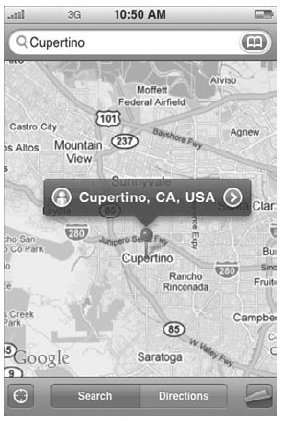
Figure 7-1. FIGURE 7-1
Before you start looking at the mapping capabilities of iPhone OS and MonoTouch, here are some mapping terms that are used throughout this chapter:
Latitude: The Y value of a location (90 to −90 degrees north to south).
Longitude: The X value of a location (180 to −180 degrees ...
Read now
Unlock full access


 O’Reilly covers everything we've got, with content to help us build a world-class technology community, upgrade the capabilities and competencies of our teams, and improve overall team performance as well as their engagement.I wanted to learn C and C++, but it didn't click for me until I picked up an O'Reilly book. When I went on the O’Reilly platform, I was astonished to find all the books there, plus live events and sandboxes so you could play around with the technology.I’ve been on the O’Reilly platform for more than eight years. I use a couple of learning platforms, but I'm on O'Reilly more than anybody else. When you're there, you start learning. I'm never disappointed.I'm always learning. So when I got on to O'Reilly, I was like a kid in a candy store. There are playlists. There are answers. There's on-demand training. It's worth its weight in gold, in terms of what it allows me to do.