April 2007
Intermediate to advanced
511 pages
12h 4m
English
In this chapter, we will move our application from its home in a test directory to a setting that is more consistent with commercial implementations.
We will create two key pieces for implementing our application:
A local XUL application communicating with a Personal Hypertext Processor (PHP) server
A remote XUL application being served by PHP scripts
Both implementations will use an SQL database to hold user and password information to conduct the authentication process. Figure 4-1 shows a block diagram illustrating the relationship of the main elements of our design.
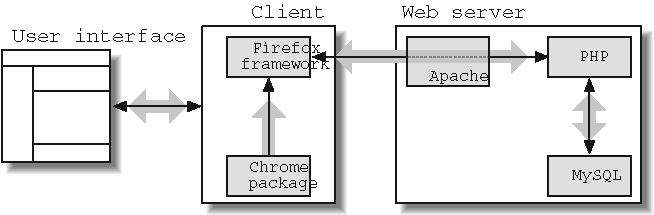
This book uses the term XUL application to describe our NewsSearch project. This differs from conventional web applications that are designed to be served web pages that are rendered by web browsers. A XUL application, however, can be implemented as a page served to a XUL-capable browser, or it can be configured to run as an application local to the user’s machine. In the case of the latter, the files that comprise the application (JavaScript source, stylesheets, datafiles) are installed in a chrome directory and run as a chrome URL.
To date, the most popular XUL applications, such as the Firefox browser, Thunderbird mailer, and Sunbird calendar, are implemented as bundled applications running from the user’s chrome directory. ...
Read now
Unlock full access


 O’Reilly covers everything we've got, with content to help us build a world-class technology community, upgrade the capabilities and competencies of our teams, and improve overall team performance as well as their engagement.I wanted to learn C and C++, but it didn't click for me until I picked up an O'Reilly book. When I went on the O’Reilly platform, I was astonished to find all the books there, plus live events and sandboxes so you could play around with the technology.I’ve been on the O’Reilly platform for more than eight years. I use a couple of learning platforms, but I'm on O'Reilly more than anybody else. When you're there, you start learning. I'm never disappointed.I'm always learning. So when I got on to O'Reilly, I was like a kid in a candy store. There are playlists. There are answers. There's on-demand training. It's worth its weight in gold, in terms of what it allows me to do.