April 2003
Intermediate to advanced
560 pages
14h 4m
English
You can add server-side controls to a Web Form in two ways: manually (by writing HTML into the HTML page), or by dragging controls from the toolbox to the Design page. For example, suppose you want to use buttons to let the user choose one of three Shippers provided in the Northwinds database. You could write the following HTML into the <form> element in the HTML window:
<asp:RadioButton GroupName="Shipper" id="Airborne"
    text = "Airborne Express" Checked="True" runat="server">
</asp:RadioButton>
<asp:RadioButton GroupName="Shipper" id="UPS"
    text = "United Parcel Service" runat="server">
</asp:RadioButton>
<asp:RadioButton GroupName="Shipper" id="Federal"
    text = "Federal Express" runat="server">
</asp:RadioButton>
The asp tags declare server-side ASP.NET controls that are replaced with normal HTML when the server processes the page. When you run the application, the browser displays three radio buttons in a button group; pressing one will deselect the others.
You can create the same effect more easily by dragging three buttons from the Visual Studio toolbox onto the Form, as illustrated in Figure 15-3.
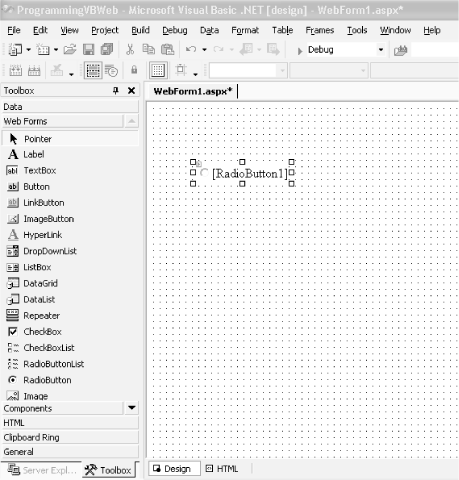
Figure 15-3. Dragging buttons onto the Web Form
You can add controls to a page in one of two modes. The default mode is GridLayout. When you add controls in GridLayout mode, they are arranged in the browser using absolute positioning (x and y coordinates).
The alternative ...
Read now
Unlock full access


 O’Reilly covers everything we've got, with content to help us build a world-class technology community, upgrade the capabilities and competencies of our teams, and improve overall team performance as well as their engagement.I wanted to learn C and C++, but it didn't click for me until I picked up an O'Reilly book. When I went on the O’Reilly platform, I was astonished to find all the books there, plus live events and sandboxes so you could play around with the technology.I’ve been on the O’Reilly platform for more than eight years. I use a couple of learning platforms, but I'm on O'Reilly more than anybody else. When you're there, you start learning. I'm never disappointed.I'm always learning. So when I got on to O'Reilly, I was like a kid in a candy store. There are playlists. There are answers. There's on-demand training. It's worth its weight in gold, in terms of what it allows me to do.