April 2009
Intermediate to advanced
479 pages
12h 55m
English
You have to start somewhere, so I won't break the tradition of using a Hello world program as the first example.
Place the following lines into a file called hello.rb as shown in Listing 3-1.
# Saying hello the Ruby way puts 'Hello, Ruby!' |
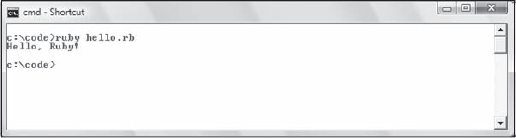
To run this, execute ruby hello.rb from the command line. Not surprisingly, Ruby displays the string Hello, Ruby! as shown in Figure 3-1.
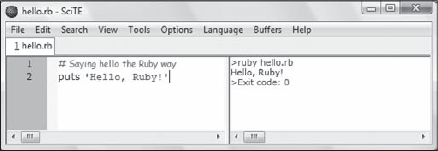
When working with single Ruby files on Windows, it is convenient to use the SciTE editor (shown in Figure 3-2 that gets installed with the One-Click Ruby Installer. By default, this is located in c:\ruby\scite\SciTE.exe. If you opt to do the same, press F5 to run the hello.rb program or reach for the Tools menu.
In its extreme simplicity, this example already offers grounds for a few important considerations.
You run your program by simply invoking the Ruby interpreter (aptly named ruby). Being an interpreted language, you didn't have to compile it first, obtain an executable, and then run it.
From the first line you can see how Ruby comments begin with a # character and continue for the rest of the line. You can also place comments in line with code:
puts 'Hello, Ruby!' # Saying hi from Ruby
When commenting ...
Read now
Unlock full access


 O’Reilly covers everything we've got, with content to help us build a world-class technology community, upgrade the capabilities and competencies of our teams, and improve overall team performance as well as their engagement.I wanted to learn C and C++, but it didn't click for me until I picked up an O'Reilly book. When I went on the O’Reilly platform, I was astonished to find all the books there, plus live events and sandboxes so you could play around with the technology.I’ve been on the O’Reilly platform for more than eight years. I use a couple of learning platforms, but I'm on O'Reilly more than anybody else. When you're there, you start learning. I'm never disappointed.I'm always learning. So when I got on to O'Reilly, I was like a kid in a candy store. There are playlists. There are answers. There's on-demand training. It's worth its weight in gold, in terms of what it allows me to do.