April 2007
Beginner
384 pages
6h 50m
English
In This Chapter
Uploading photographs
Viewing thumbnails and full images
Using The GIMP for image editing
Ubuntu provides several graphical manipulation tools. You can save photos from your digital camera and create, manipulate, and view the photos using these tools. Ubuntu covers all bases when it comes to multimedia.
This chapter describes how to work with digital cameras, graphical images, and more.
Digital photography lets you take pictures and store them on a computer for viewing and reproduction. Doing away with traditional film is a great convenience. Ubuntu Linux provides the tools to download photos from a camera.
Most digital cameras provide software to transfer photos from the camera to a computer. However, most such software is incompatible with Linux and your Ubuntu computer. Fortunately, you can still easily transfer photos to your Ubuntu computer using generic Linux utilities. This section describes how to perform such transfers.
So go out and take your shots. Later, you can download your photos to Ubuntu as follows.
Connect your camera to your Ubuntu computer using a USB (or FireWire) cable.
Ubuntu recognizes the device and launches the Photo Import dialog, shown in Figure 21-1 .
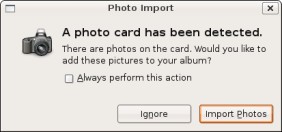
Figure 21.1. Figure 21-1: The Photo Import dialog.
Click the Import Photos button.
Ubuntu mounts your camera ...
Read now
Unlock full access


 O’Reilly covers everything we've got, with content to help us build a world-class technology community, upgrade the capabilities and competencies of our teams, and improve overall team performance as well as their engagement.I wanted to learn C and C++, but it didn't click for me until I picked up an O'Reilly book. When I went on the O’Reilly platform, I was astonished to find all the books there, plus live events and sandboxes so you could play around with the technology.I’ve been on the O’Reilly platform for more than eight years. I use a couple of learning platforms, but I'm on O'Reilly more than anybody else. When you're there, you start learning. I'm never disappointed.I'm always learning. So when I got on to O'Reilly, I was like a kid in a candy store. There are playlists. There are answers. There's on-demand training. It's worth its weight in gold, in terms of what it allows me to do.