July 2005
Intermediate to advanced
240 pages
5h 27m
English
Forums are a powerful communication tool within a Moodle course. Think of them as an online message board where you and your students can post messages to each other while easily keeping track of individual conversations. Forums are the primary tool for having a discussion online and are the central organizing feature in the Social course type. In fact, you’ve already posted your first message to a forum back in Chapter 2. When you posted your news item, you were posting to a special forum used in every course for announcements and news.
Forums allow you and your students to communicate with each other at any time, from anywhere with an Internet connection. Students don’t have to be logged in at the same time you are to communicate with you or their classmates. Figure 4-1 demonstrates how conversations are tracked through time, and readers can review the history of the conversation by simply reading the page. Those of us in the computer biz call this type of communication “asynchronous,” meaning “not happening at the same time.” This can be compared to a synchronous forms of communication like a chat room, instant messaging, or a face-to-face conversation.
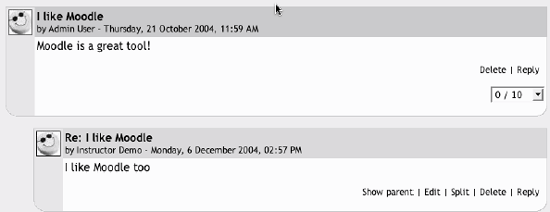
Figure 4-1. Forum posting
Because forums are asynchronous, students can take their time composing a reply. There is a lot of research indicating more students are willing to participate ...
Read now
Unlock full access


 O’Reilly covers everything we've got, with content to help us build a world-class technology community, upgrade the capabilities and competencies of our teams, and improve overall team performance as well as their engagement.I wanted to learn C and C++, but it didn't click for me until I picked up an O'Reilly book. When I went on the O’Reilly platform, I was astonished to find all the books there, plus live events and sandboxes so you could play around with the technology.I’ve been on the O’Reilly platform for more than eight years. I use a couple of learning platforms, but I'm on O'Reilly more than anybody else. When you're there, you start learning. I'm never disappointed.I'm always learning. So when I got on to O'Reilly, I was like a kid in a candy store. There are playlists. There are answers. There's on-demand training. It's worth its weight in gold, in terms of what it allows me to do.