July 1999
Intermediate to advanced
432 pages
13h 10m
English
In Microsoft Access, queries can be defined in several different ways, but they all come down to an SQL statement in the end. The Query Wizard helps create a query by asking the user to respond to a series of questions. This approach is the most user-friendly, but also the least powerful. Access also provides a Query Design window with two different views. The Design View is shown in Figure 6.1.

Figure 6-1. The Access Query Design View
Query Design View displays table schemes, along with their relationships, and allows the user to select columns to return (projection) and specify criteria for the returned data (selection). Figure 6.1 shows a query definition that joins the BOOKS and PUBLISHERS table and returns the Title, Publisher, and Price of all books whose price is over $25.00.
The Query Design window also has an SQL View. Switching to this view shows the SQL statement that corresponds to the Design View query. Figure 6.2 shows the corresponding SQL statement for the query in Figure 6.1.
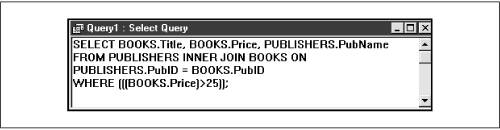
Figure 6-2. The Access SQL View of Figure 6.1
In addition to using the Design View, users can enter SQL statements directly into the SQL View window. In fact, some constructions, such as directly creating the union of two tables in a third table, cannot be accomplished using ...
Read now
Unlock full access


 O’Reilly covers everything we've got, with content to help us build a world-class technology community, upgrade the capabilities and competencies of our teams, and improve overall team performance as well as their engagement.I wanted to learn C and C++, but it didn't click for me until I picked up an O'Reilly book. When I went on the O’Reilly platform, I was astonished to find all the books there, plus live events and sandboxes so you could play around with the technology.I’ve been on the O’Reilly platform for more than eight years. I use a couple of learning platforms, but I'm on O'Reilly more than anybody else. When you're there, you start learning. I'm never disappointed.I'm always learning. So when I got on to O'Reilly, I was like a kid in a candy store. There are playlists. There are answers. There's on-demand training. It's worth its weight in gold, in terms of what it allows me to do.