January 2005
Intermediate to advanced
256 pages
6h 34m
English
Once a user has performed a number of edits and has a finished project, she presumably needs to save the movie to disk. In QuickTime, many different actions can be thought of as “saving” a movie. Perhaps the simplest and most flexible option is to let the user decide.
The SaveableQTEditor uses a
QTFile to keep track of where a movie was loaded
from (null in the case of a new movie). This is
used by the doSave( ) method to indicate where the
saved file goes:
public void doSave( ) throws QTException {
  // if no existing file, then prompt for one
  if (file =  = null) {
      file = new QTFile (new File ("simplemovie.mov"));
  }
  int flags = StdQTConstants.createMovieFileDeleteCurFile |
      StdQTConstants.createMovieFileDontCreateResFile |
      StdQTConstants.showUserSettingsDialog;
  movie.convertToFile (file, // file
                       StdQTConstants.kQTFileTypeMovie, // filetype,
                       StdQTConstants.kMoviePlayer, // creator
                       IOConstants.smSystemScript, // scriptTag
                       flags);
}Compile and run this example with ant run-ch03-saveableqteditor.
When the user hits the Save menu item, she’ll see the QuickTime Save As dialog as shown in Figure 3-3.
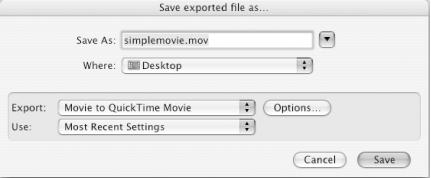
Figure 3-3. QuickTime Save As dialog
This dialog’s Export selector gives the user four choices:
Saves a QuickTime reference movie , a tiny (typically 4 or 8 KB) file that contains just references (pointers) to the media in their original locations ...
Read now
Unlock full access


 O’Reilly covers everything we've got, with content to help us build a world-class technology community, upgrade the capabilities and competencies of our teams, and improve overall team performance as well as their engagement.I wanted to learn C and C++, but it didn't click for me until I picked up an O'Reilly book. When I went on the O’Reilly platform, I was astonished to find all the books there, plus live events and sandboxes so you could play around with the technology.I’ve been on the O’Reilly platform for more than eight years. I use a couple of learning platforms, but I'm on O'Reilly more than anybody else. When you're there, you start learning. I'm never disappointed.I'm always learning. So when I got on to O'Reilly, I was like a kid in a candy store. There are playlists. There are answers. There's on-demand training. It's worth its weight in gold, in terms of what it allows me to do.