November 2004
Intermediate to advanced
448 pages
13h 56m
English
IIS runs as a set of services on Windows Server 2003. Each service uses Windows Server 2003 Application Programming Interfaces (APIs) to interact with the operating system’s TCP/IP protocol stack. Figure 12-2 illustrates the interaction between IIS and the TCP/IP stack.
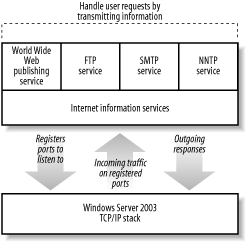
Figure 12-2. IIS and the Windows Server 2003 TCP/IP stack
As shown in Figure 12-2, each IIS service instructs the operating system to listen for incoming network traffic on specific TCP and UDP ports. These ports allow client applications to contact specific applications on a server. For example, web sites typically listen to TCP port 80, while FTP sites usually listen to TCP port 21.
When the TCP/IP stack receives incoming traffic on a port registered to an IIS service, the stack forwards that traffic to the appropriate service. The service can then analyze the traffic, take the appropriate actions, and if necessary, send a response back to the client that sent the request.
Each IIS service processes incoming and outgoing traffic slightly differently. The FTP, SMTP, and NNTP services are all fairly straightforward, processing and responding to requests as defined in the appropriate Internet Engineering Task Force (IETF) Request for Comment (RFC) documents.
For ASP applications to work, IIS’ World Wide Web (WWW) Publishing Service has to do a bit more work. When a user requests a specific ...
Read now
Unlock full access


 O’Reilly covers everything we've got, with content to help us build a world-class technology community, upgrade the capabilities and competencies of our teams, and improve overall team performance as well as their engagement.I wanted to learn C and C++, but it didn't click for me until I picked up an O'Reilly book. When I went on the O’Reilly platform, I was astonished to find all the books there, plus live events and sandboxes so you could play around with the technology.I’ve been on the O’Reilly platform for more than eight years. I use a couple of learning platforms, but I'm on O'Reilly more than anybody else. When you're there, you start learning. I'm never disappointed.I'm always learning. So when I got on to O'Reilly, I was like a kid in a candy store. There are playlists. There are answers. There's on-demand training. It's worth its weight in gold, in terms of what it allows me to do.