June 2001
Intermediate to advanced
526 pages
16h 29m
English
Mac OS 9 offers three different ways to use AppleScript to control how the computer responds to verbal commands and “speaks” back to the computer user. Using combinations of these methods, you can create complex and useful speech-related scripts:
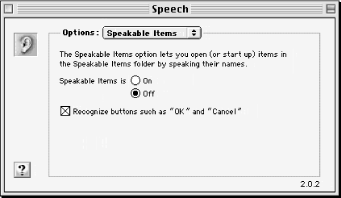
The listen for AppleScript command, which controls the computer’s response to spoken commands. The options that control how the computer listens for commands, such as the key on your keyboard that will toggle this technology on and off, can be controlled with the Speech control panel (see Figure 30-1).
 |
The SpeakableItems technology allows the user to execute a script inside the SpeakableItems folder (which is located in the startup disk:System Folder:Apple Menu Items folder) just by speaking the script’s filename into the computer’s microphone.
The say command, a scripting addition that has been part of the Standard Additions osax since Mac OS 8.5 (See Appendix A). As long as the Speech Manager extension is enabled, the computer will speak any text or string that you specify in an AppleScript with say, as in:
say "It's nice to hear text rather than read it sometimes."
Figure 30-2 shows the three extensions that have to be installed with Mac OS 9 to use the three speech-related technologies with AppleScript.
Read now
Unlock full access


 O’Reilly covers everything we've got, with content to help us build a world-class technology community, upgrade the capabilities and competencies of our teams, and improve overall team performance as well as their engagement.I wanted to learn C and C++, but it didn't click for me until I picked up an O'Reilly book. When I went on the O’Reilly platform, I was astonished to find all the books there, plus live events and sandboxes so you could play around with the technology.I’ve been on the O’Reilly platform for more than eight years. I use a couple of learning platforms, but I'm on O'Reilly more than anybody else. When you're there, you start learning. I'm never disappointed.I'm always learning. So when I got on to O'Reilly, I was like a kid in a candy store. There are playlists. There are answers. There's on-demand training. It's worth its weight in gold, in terms of what it allows me to do.