February 2008
Intermediate to advanced
428 pages
8h 52m
English
You see that style rules can live in many places: inline next to the control; embedded within the page; and stored in an external style sheet. VWD helps you track all these style rules and even shift them from one location to another.
Here's a typical situation: You're adding to the Web site and realize that you've embedded styles in several pages. You want to consolidate the embedded styles into one external style sheet. Rather than embark on a frantic cut-and-paste blitz, follow these steps to move embedded styles to an external style sheet:
If your project doesn't have an external cascading style sheet, add one (File New File
 Style Sheet).
Open an ASP.NET page in Design view that includes embedded style rules or insert a style such as this:
<style type="text/css">
    .rulez
    {font-size: xx-large;}
</style>
Open the Manage Styles pane (View Manage Styles), as shown in Figure 10-6.
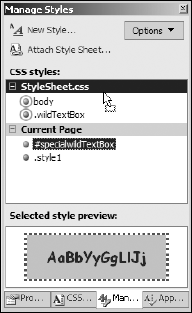
In the Manage Styles pane, from the Current Page category, ...